Payroll Compliance for CPA and Accounting Firms: Requirements and Checklist

Summary
Use this payroll compliance checklist to assign owners, set deadlines and document approvals, tax deposits, filings and reconciliations for each client employer. CPA and accounting firms that need extra capacity can get payroll preparation and reconciliation support from Acculink at all-inclusive rates of $8 to $35 per hour, depending on the role.
A payroll compliance checklist should cover employer setup, each pay run, tax deposits and filings, payroll reconciliation, and year-end reporting. For CPA and accounting firms, each check also needs a named owner, a deadline, and evidence of completion for each client employer.
The work can look complete in a payroll platform while the firm's file still has an open item. A client can approve the payroll register before funding clears. A tax return can be accepted while a related deposit remains unresolved. Record each milestone separately so your team can see what still needs action.
Key takeaways
- Set up each employer separately. Confirm entity details, work locations, tax accounts, deposit schedules, and approval authority before the first payroll.
- Review changes before release. Compare the draft register to the prior comparable run and explain material or unusual differences.
- Track deposits and returns separately. Save payment evidence for the deposit and acceptance evidence for the filing.
- Reconcile payroll through the ledger. Clear funding and liability differences while the source documents and approvals are easy to retrieve.
- Give exceptions an owner and a decision deadline. A single queue helps a reviewer see which employer needs action before the next cutoff.
Acculink payroll specialists help CPA and accounting firms validate payroll registers, reconcile liabilities, and prepare the records reviewers need. All-inclusive rates are $8 to $35 per hour, depending on the role. Use a 40-hour free trial to test the handoff on one client payroll, with no long-term contract. Request a payroll support trial
What is payroll compliance?
Payroll compliance means following the rules for paying employees, withholding and depositing employment taxes, filing payroll returns and wage statements, and keeping the required records.
For a firm managing client payroll, those responsibilities turn into checks for each employer. Confirm which requirements apply, who has authority to act, and where the team will keep evidence. A shared workflow can cover every client while preserving separate approval, deposit, and filing records for each employer.
Payroll compliance checklist at a glance
Use this table as a recurring work plan. Duplicate the relevant items for each employer, jurisdiction, and pay group. Add internal deadlines early enough for the responsible person to review exceptions before the external cutoff.
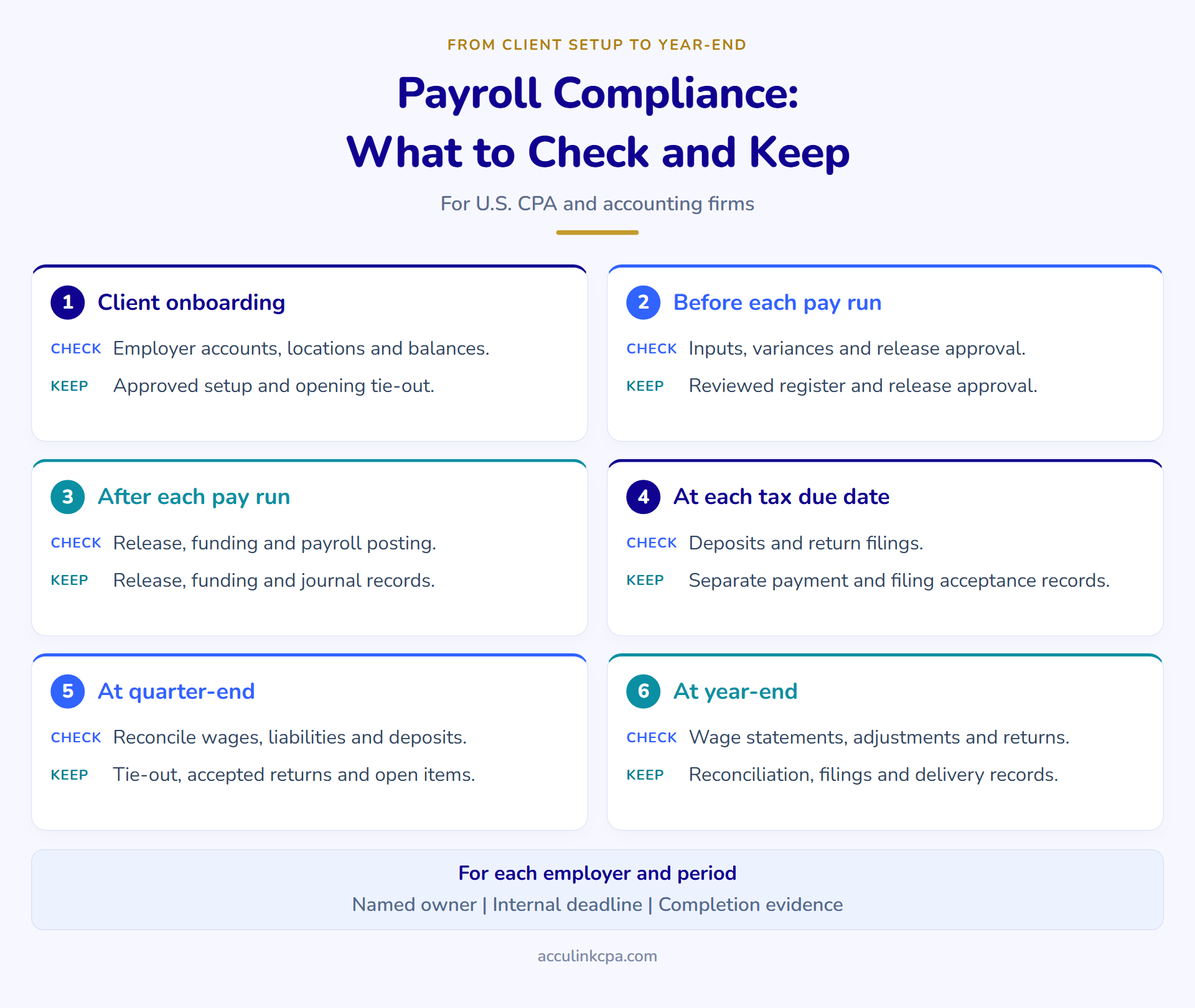
| When | What to check | What to keep |
|---|---|---|
| Client onboarding | Confirm employer accounts, worker locations, pay schedules, authorizations, and year-to-date balances | Approved setup record and opening balance reconciliation |
| Before each pay run | Check source changes, validate the draft, resolve variances, and obtain approval | Approved inputs, reviewed register, and release approval |
| After each pay run | Confirm release and funding, post payroll, and follow up on rejected payments | Release confirmation, funding record, and posted journal |
| At each tax due date | Monitor required deposits and return filings by agency | Payment evidence and filing acceptance, tracked separately |
| At quarter-end | Reconcile wages, liabilities, deposits, and returns | Tie-out, accepted returns, and open-item log |
| At year-end | Validate wage statements, year-end adjustments, and annual returns | Approved reconciliation, filings, delivery evidence, and corrections log |
Which payroll checks could your team hand off?
Leave your work email. We'll help scope register checks and reconciliation support for your client payrolls.
1. Set up each employer before the first pay run
Build one setup record for each legal employer. A client group may share a contact or payroll platform across entities while each employer has its own identification numbers, filings, and payment history.
Confirm the employer, work locations, and access
- Verify the legal name, EIN, authorized contacts, and relevant state and local payroll tax accounts.
- Record the pay frequency and payday for each pay group. Confirm input deadlines, the person who can approve the register, and the funding cutoff.
- Capture where each employee actually works. Route new or changed locations to the person who determines applicable registration, withholding, unemployment, and local obligations.
- Confirm who collects required withholding forms, sets up deductions, and maintains approvals for pay changes. IRS Form W-4
- Test access to each system the team will use. Assign individual permissions for preparation, review, and release, including coverage for an absent approver. Acculink payroll data security controls
A remote employee move can affect more than a mailing address. Put changes in work location on the regular intake form and give the reviewer the effective date. Pay frequency and other wage rules can vary by jurisdiction. U.S. Department of Labor state payday requirements
Tie opening balances to the former system
For a midyear transfer, get the payroll registers, year-to-date wage and deduction reports, filed returns, deposit records, and unresolved notices from the prior system. Tie the imported balances by employee and tax category to those records. Confirm which party covers each filing and deposit around the transition.
Record the last payroll handled by the prior provider and the first run in the new system. If a prior-quarter return is due after the transition, assign it explicitly. The payroll start date alone can leave that responsibility unclear.
2. Review and approve each payroll before release
Assign a preparer to validate inputs and a reviewer to check the draft payroll register. Define who can approve release in the engagement. When the client retains that authority, build enough review time into the schedule to collect explicit approval.
| Input or check | What the preparer verifies | What the reviewer checks |
|---|---|---|
| Headcount and pay rates | Starts, departures, effective dates, and written changes | Unexpected workers or changes to recurring pay |
| Hours and variable pay | Approved hours, overtime, bonuses, and commissions | Unusual totals, missing approvals, and exception handling |
| Deductions and withholding | Approved changes, effective dates, and payroll setup | Variances in taxes, deductions, and take-home pay |
| Bank instructions | Change request and confirmation through the agreed channel | Evidence of independent confirmation for sensitive changes |
| Funding and release | Debit amounts, dates, and approval deadline | Correct employer, pay date, totals, and release authority |
Compare employee count, gross wages, net pay, taxes, and deductions with a comparable pay run. An extra payday, a different pay group, or a bonus run can explain a large change. Document the reason so the reviewer can tell an expected variance from an error.
For overtime exceptions, give the reviewer the hours and pay components that affect the calculation. U.S. Department of Labor overtime guidance
Use thresholds as review triggers. Investigate sensitive changes such as unverified bank details or a terminated employee on the active register whenever they appear. If an exception affects a filing, payment, or payroll cutoff, identify who can make the decision that day.
What happens when a client changes payroll after approval?
Save the approved register as a dated version. If the client adds a bonus, corrects hours, or changes deductions after approval, record the request, rerun the affected checks, and ask the authorized approver to approve the revised totals. Confirm whether the change also affects the funding amount, payment cutoff, or deposit schedule.
Suppose the reviewer has already cleared a biweekly payroll when the client sends a late bonus request. The preparer records the request and checks which employees and totals change. The reviewer compares the revised register with the approved version. The authorized client contact then decides whether to approve the change for this run or authorize a separate run.
Keep both register versions and the final approval in the payroll file. That gives the next reviewer a record of which figures the approver saw and which version the team released. If funding already began, log the provider's correction steps and assign someone to verify the resulting payment and ledger entries.
3. Confirm payroll release and reconcile the posting
After release, compare the final register with the approved version. Confirm funding and look for returned direct deposits or other payment failures. Record who is handling any correction and how the revised payment will be verified.
Then post the payroll journal and tie it back to the register. Use the payroll reports to support wage expense, employer tax expense, employee withholdings, employer tax liabilities, and benefit deductions. Match the clearing entries to the related funding movements. A single provider debit may cover several components, and some providers collect tax and wages on different dates.
Use a payroll reconciliation worksheet that includes the employer, period, liability account or cash movement, expected amount, posted amount, difference, explanation, and reviewer sign-off. Identify whether a difference is a timing item or a correction. Track when an expected debit clears so it can be closed with evidence.
Example. A payroll register shows $31,400 in net pay and a scheduled tax debit of $9,200. The bank shows the $31,400 withdrawal on payday, so the firm matches it to the register.
The firm leaves the $9,200 open until it confirms the tax debit and verifies the deposit. The reviewer can see that net pay funding cleared while tax verification is still in progress.
Payroll differences taking too much review time?
Get help with register checks, journals and liability reconciliations in your existing systems.
4. Track federal, state, and local payroll tax compliance
Put each employer's deposit and filing obligations on two linked schedules. For each obligation, record the agency, tax account, period, amount, due date, owner, and evidence. Add separate fields for submission, acceptance, and payment confirmation.
Identify the federal deposit schedule
Federal employment tax deposits generally follow a monthly or semiweekly schedule based on the employer's lookback period. Special rules can accelerate a deposit. For example, accumulating $100,000 or more in covered taxes within a deposit period generally requires a deposit by the next business day. IRS Publication 15, deposit rules
Set the deposit schedule by employer and review exceptions for off-cycle or unusually large runs. Put the tax return due date on a separate calendar entry.
Most employers report federal income tax withholding and Social Security and Medicare taxes on Form 941. Some use another return, such as Form 944 when the IRS authorizes annual filing. Form 940 generally reports federal unemployment tax for employers subject to it. IRS employment tax due dates · IRS annual filing eligibility
Confirm who can act and who checks the outcome
Write down who prepares, authorizes, submits, and verifies each filing or deposit. The payroll platform or provider agreement should specify which accounts and filings it covers. Where a provider handles payments, build a way for the employer or authorized party to verify them independently.
The employer generally remains responsible for federal employment tax obligations when it outsources payroll. Certain third-party arrangements can affect responsibility, so the authorization and agreement matter. Retain the confirmation or official payment record alongside the payroll file. IRS guidance on third-party payers
5. Close the quarter, prepare year-end, and keep the evidence
Quarter-end payroll reconciliation
- Gather payroll registers for the quarter and identify any off-cycle or corrected runs.
- Reconcile taxable wage categories and tax liabilities to the applicable return schedules. Document adjustments by tax and jurisdiction.
- Compare liability records, deposits, and any outstanding balances. Confirm that payments reached the correct account and period.
- Check return acceptance and record any follow-up on rejected filings, corrections, or agency notices.
- Tie the quarter-end payroll liability accounts to supported balances and carry unresolved items forward with an owner.
Hold a short review before the filing deadline to settle differences while the team still has time to obtain missing records. Keep the approved tie-out in the employer's file, along with the final return and acceptance.
If the team finds an error on a previously filed Form 941, review the correction process and assign the amended return to the authorized filer. IRS guidance on Form 941-X
Year-end wage reporting
Confirm employee names and identification details, year-end compensation adjustments, and taxable benefits before preparing wage statements. Reconcile applicable wage and tax totals with quarterly and annual payroll records. Document differences tied to the applicable reporting rules, amendments, or rounding.
Employers generally furnish Forms W-2 to employees and file them with the Social Security Administration by January 31. When the deadline falls on a weekend or legal holiday, it moves to the next business day. For 2026 wages, the general deadline is February 1, 2027. IRS W-2 and W-3 instructions · SSA filing deadlines
Track correction requests in the same file as the original submission and retain acceptance for any corrected report.
Payroll record retention
Federal employment tax rules generally require keeping records for at least four years from the later of the tax due date or the payment date. Federal employment tax record requirements
Under the Fair Labor Standards Act, covered employers generally retain payroll records for three years and wage computation records such as time cards and schedules for two years. Build a retention schedule that accounts for all requirements that apply to the record, including state rules. Three-year records under 29 CFR 516.5 · Two-year records under 29 CFR 516.6
Manage exceptions across multiple client payrolls
Review the portfolio by the next decision deadline. Put missed funding, unresolved setup, potentially late deposits, and filings that need action at the top. A routine account with complete evidence can stay off the daily review list.
| Client issue | Next action | Evidence that closes the item |
|---|---|---|
| Employee moved to a new work state | Confirm effective date and route the setup decision to the firm's payroll lead | Documented decision and updated setup |
| Client approved a bonus after cutoff | Decide who can authorize an off-cycle run and review any deposit impact | Approved run and scheduled deposit review |
| Provider submitted a return that was rejected | Assign correction and confirm acceptance after resubmission | Accepted return and reference number |
| Tax debit is missing after the expected date | Verify payment status with the authorized party and route any shortfall | Confirmed deposit or correction record |
Schedule backup coverage around the approval and funding deadlines. At the firm level, monitor open issues by employer and time remaining to resolve them. Those two fields help a lead decide where to assign a reviewer without asking the team to reconstruct each file.
What should a reviewer see in the payroll file?
Build the file so a reviewer can answer three questions quickly. What changed, who approved it, and which payments or filings still need verification? Keep approved inputs next to the final register, with a dated release approval and references to the payment and filing records.
When a client uses several systems, use one index for each employer and period. The payroll platform may hold the register, the practice management system may hold the approval, and agency portals may hold payment or filing evidence. Link to the records in the approved systems and flag missing evidence in the employer's queue.
Where Acculink can support your payroll team
Firms can delegate standard preparation and reconciliation work to Acculink payroll specialists. Assign them to check payroll inputs, compare draft registers, prepare reconciliations, post agreed journals, or organize filing support and documentation within your workflow. Agree on the approval and release roles before the first assignment. Acculink payroll management services
Start with one pay group and define what the reviewer should receive. A practical first handoff includes the source change list, draft register, variance explanations, and unresolved items. That gives your firm a direct way to evaluate the work before extending support to more clients. What payroll outsourcing costs
If the team needs ongoing coverage in its existing payroll system, share the client count, pay frequencies, jurisdictions, and the work that queues up each cycle. Hire an Acculink payroll specialist · Compare payroll software for accounting firms
Frequently asked questions
What should a payroll compliance checklist include?
Include employer setup, pay-run inputs and approval, funding, payroll journal reconciliation, tax deposits and filings, year-end reporting, and record retention. Assign each item to a specific employer and owner, with the due date and completion evidence.
What is the difference between a payroll processing checklist and a compliance checklist?
A payroll processing checklist guides a pay run from inputs through release and posting. A payroll compliance checklist also covers employer registrations, tax deposits, returns, wage statements, and record retention. Use the processing checklist inside the broader compliance calendar.
Does filing Form 941 confirm that payroll taxes were deposited?
Form 941 reports employment taxes for the quarter. Use payment records to verify deposits separately and match them to the correct employer and period. An accepted return and an accepted payment document different steps. IRS employment tax due dates
What should a CPA firm do when a client hires someone in a new state?
Confirm the work location and effective date, assign someone to review the applicable registration and withholding rules, and record the approved setup before processing wages under it. Update the payroll calendar to reflect any new state or local obligations.
Who is responsible for payroll taxes when payroll is outsourced?
The employer generally remains responsible. Certain arrangements can affect that responsibility. Identify the arrangement, specify who handles deposits and returns, and decide who checks that each activity was completed. IRS third-party payroll guidance
Which payroll tasks can an accounting firm delegate?
Common assignments include gathering approved inputs, preparing registers, documenting variances, posting approved journals, reconciling accounts, and preparing filing support. Define submission, approval, and release authority separately for each employer.
Start with the payroll work that needs coverage
Bring one pay group's schedule, payroll platform, and the checks your reviewers repeat each cycle. Acculink can help you scope preparation and reconciliation support around the firm's approval process. Request a payroll support trial
Tags:
About the Author

Related Posts

Top 10 Offshore Staffing Companies for Accounting Firms (2026)
Hiring an offshore team is one of the highest-leverage moves a short-staffed CPA firm can make, but the partne…
Top Outsourced Accounting Firms for CPA Practices (2026)
Choosing an outsourced accounting partner is a high-stakes call because the team touches your clients' data. T…

Top 10 Payroll Outsourcing Companies for CPA and Accounting Firms (2026)
This guide compares ten payroll outsourcing companies for U.S. CPA and accounting firms. It separates processi…

8 Best Tax Staffing Companies for CPA and Accounting Firms (2027)
Compare eight tax staffing companies and programs for CPA and accounting firms in the 2027 tax season. Evaluat…