Best Payroll Software for Accounting and CPA Firms (2027)

Summary
Compare payroll software for accountants across Gusto, QuickBooks, OnPay, Patriot, ADP, Paychex and Accounting CS, with pricing, integrations and multi-client workflow guidance for CPA and accounting firms. Plan a consistent 2027 rollout and see how Acculink's published all-inclusive, role-based payroll support at $8 to $35 per hour can add processing capacity around the software your firm selects.
Quick answer: Shortlist Gusto for client management and flexible billing, QuickBooks Payroll for existing QuickBooks clients, OnPay for a mixed QuickBooks and Xero client base, and Patriot for a lower starting price. Choose around your clients' needs and your firm's workflow.
This guide compares seven payroll software options for accountants and CPA firms using published features and prices reviewed on November 2, 2026. Use it to plan client payroll for 2027, then confirm the rates and features available when you sign up.
Payroll software for accountants lets CPA and accounting firms calculate employee pay, manage payroll deductions and filings, and maintain payroll records for their clients. The firm also needs a practical way to manage access, deadlines, and reviews across separate client companies.
A platform can look simple for one employer and become difficult when your team manages different pay dates, missing hours, approvals, and accounting entries for twenty companies.
This comparison focuses on that firm-wide decision. The recommendations reflect published product capabilities and accountant programs, rather than a hands-on benchmark or a claim that one platform wins for every practice.
Key takeaways
- Start with how your firm delivers payroll. Running payroll for clients, helping clients run it themselves, and referring payroll to a provider require different access, billing, and support arrangements.
- Compare the accountant workspace as carefully as the payroll screen. Your team needs to see which clients are ready, which inputs are missing, and who can approve the next step.
- Separate standard pricing from accountant pricing. Client-count discounts, firm billing, accounting bundles, additional states, and optional HR tools can change the total.
- Software and processing capacity are separate decisions. Even an automated pay run needs accurate inputs, exception handling, and an accountable reviewer.
Need more payroll processing capacity? Acculink offers all-inclusive, role-based support at $8 to $35 per hour, depending on experience and payroll complexity. Firms can use outsourced payroll processing for a defined workload or hire a payroll expert for recurring capacity while retaining final review and payroll approval.
Best payroll software for each need
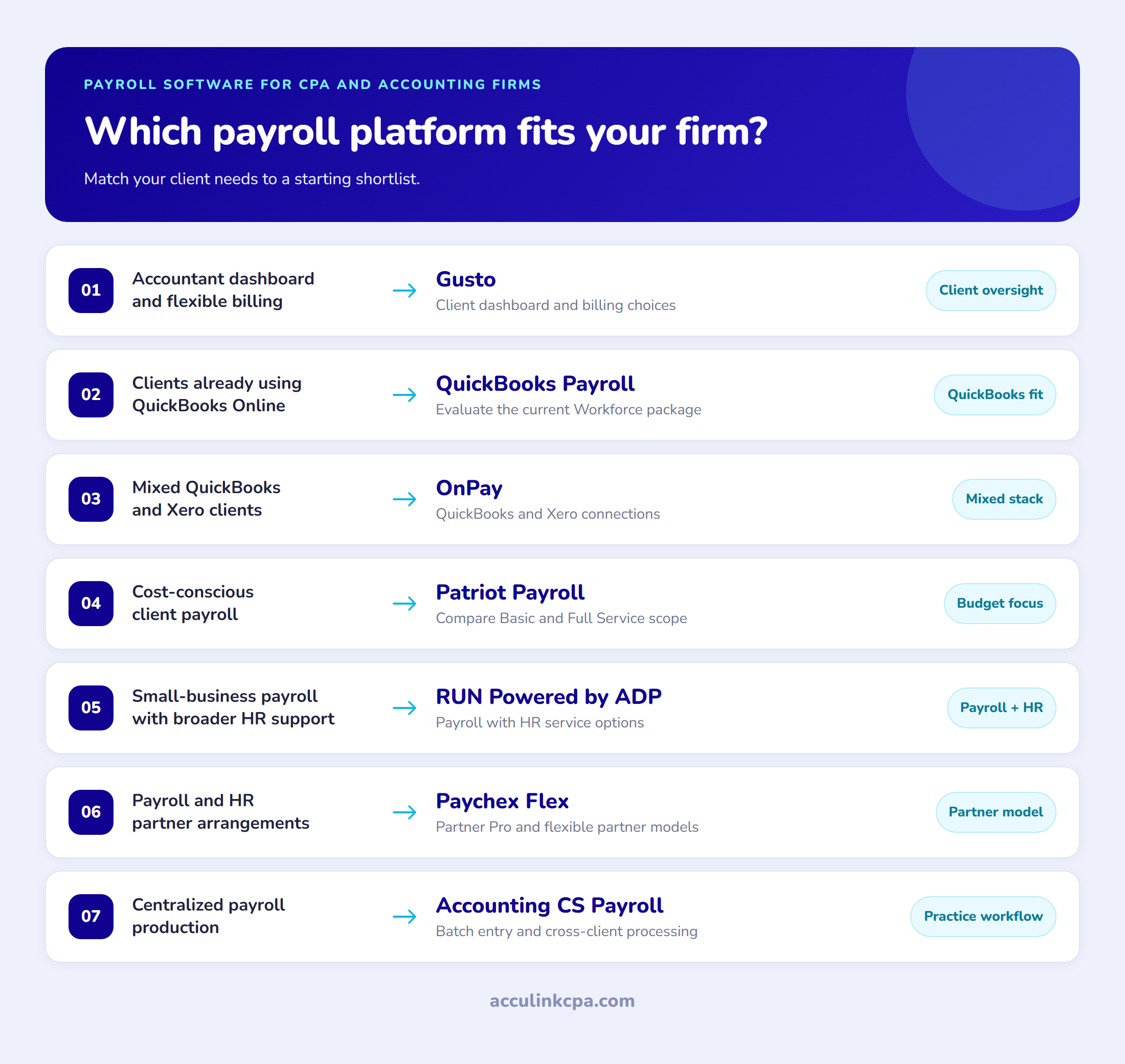
These are suggested starting points for a shortlist, based on the operating needs below.
- A dedicated accountant dashboard and flexible client billing: Gusto.
- Clients already using QuickBooks Online: QuickBooks Payroll / QuickBooks Workforce.
- A mixed QuickBooks and Xero client base: OnPay.
- A low published starting price: Patriot Payroll.
- Small-business payroll with broader HR options: RUN Powered by ADP.
- Payroll, HR, and accountant partnership options: Paychex Flex.
- A firm-operated payroll practice with cross-client processing: Accounting CS Payroll.
The best payroll software for accountants at a glance
Prices were checked on November 2, 2026. Published monthly prices below are standard U.S. reference prices before temporary promotions and accountant discounts. They are not firm-wide subscription quotes or confirmed 2027 rates. For 2027 budgeting, request the price and scope that will apply to each client company on its planned start date.
| Software | Best fit for a shortlist | Published price or pricing basis |
|---|---|---|
| Gusto | Firms wanting an accountant dashboard and billing choices | Simple: $49/month + $6/person; Plus: $80 + $12/person; Premium: $180 + $22/person |
| QuickBooks Payroll / Workforce | Firms whose clients already use QuickBooks Online | Request the applicable payroll-only or accountant rate; public accounting bundles have a different scope |
| OnPay | Firms serving clients across accounting platforms | Payroll Essentials: $49/month + $6/worker; optional products cost extra |
| Patriot Payroll | Firms comparing a lower starting software cost | Basic: $17/month + $4/worker paid; Full Service: $37 + $5/worker paid |
| RUN Powered by ADP | Small-business clients needing payroll and HR options | Request a package quote |
| Paychex Flex | Clients needing payroll alongside broader people services | Request a quote for the selected package |
| Accounting CS Payroll | Firms running payroll as a centralized practice | Contact sales for software, hosting, and connected-service pricing |
Gusto Simple covers payroll in one state; multi-state payroll is included in Plus and Premium. Patriot Basic does not include the payroll tax filing service included with Full Service. Its public pricing also lists an additional-state filing charge. Those differences matter more than the lowest base fee.
For QuickBooks, the public pricing page currently includes Workforce Payroll bundled with accounting subscriptions. An accounting-and-payroll bundle should not be compared with another vendor's payroll-only fee as though the scope were identical.
See your total payroll software cost.
Get an editable calculator for client subscriptions, worker charges, add-ons and accountant discounts.
Payroll processing software for accountants: features compared
The workspace and integration models differ. Use this table to decide what to inspect in a demonstration, then confirm access and package details for your firm.
| Software | Accountant workspace | Accounting connection or workflow | Main point to examine |
|---|---|---|---|
| Gusto | Gusto Pro, with client oversight and billing options | Evaluate the connection to each client's ledger | Client-billed versus firm-billed arrangements and plan differences |
| QuickBooks Payroll / Workforce | Intuit's accountant and client access setup | Payroll and accounting within the QuickBooks environment | Client subscriptions, staff permissions, and the current Workforce package |
| OnPay | Client dashboard with delegated permissions | Published QuickBooks Online, QuickBooks Desktop, and Xero integrations | Journal mapping and which staff or clients can perform each action |
| Patriot | Accountant partner program and company management | Accounting integration available | Basic versus Full Service, partner rates, and extra-state costs |
| ADP RUN | Accountant Connect for shared client information | Connections with accounting and other business tools | Processing access, service scope, and the quoted package |
| Paychex Flex | Partner Pro for shared client payroll and HR data | Payroll and related HR services | Referral, reseller, and other partnership arrangements |
| Accounting CS Payroll | Cross-client processing within Accounting CS | Client data collection and approvals through connected CS services | Hosting, client access, and the full processing workflow |
The cloud options for client payroll
Gusto: a starting point for accountant-led client management
Gusto gives firms a dedicated Gusto Pro workspace. Its partner program allows client billing with a revenue-share arrangement, client billing with a partner discount, or firm billing. That makes it relevant whether payroll is sold separately or included in a recurring client package.
Strengths: an accountant-focused workspace and a choice of who receives the software bill.
Watch-outs: the least expensive plan is for one-state payroll. Compare the plan needed by each client before setting a standard service fee. Treat AI features marked beta as optional additions to your evaluation, rather than established capacity your delivery model depends on.
Best for: firms looking for a cloud payroll platform with an explicit accountant relationship.
Pricing: Simple is $49 per month plus $6 per person, Plus is $80 plus $12, and Premium is $180 plus $22. Check the current Gusto plans and the accountant billing arrangement together.
QuickBooks Payroll: for clients already in the QuickBooks environment
QuickBooks Payroll is a logical candidate when the firm already maintains client books in QuickBooks Online. Intuit now presents the broader offering as QuickBooks Workforce, combining payroll with time, employee information, HR, and benefits features according to the package.
Strengths: payroll and accounting data in the same environment, with employee access through Workforce.
Watch-outs: distinguish the payroll subscription from an accounting bundle. Confirm the accountant's access, the client's plan, and the features included in that specific subscription. Features such as time tracking and setup assistance vary by tier.
Best for: firms that want to keep payroll close to existing QuickBooks bookkeeping workflows.
Pricing: obtain the current payroll-only or accountant price for the relevant client. The public pricing page includes accounting bundles, so its headline price is not a reliable payroll-only comparison.
OnPay: for a client base using different accounting platforms
OnPay provides an accountant dashboard, delegated permissions, and integrations with QuickBooks Online, QuickBooks Desktop, and Xero. Its partner arrangements include direct client billing or firm billing, with discount and revenue-share choices.
Strengths: a clear accountant workflow across more than one accounting platform. Payroll Essentials includes unlimited pay runs and multi-state payroll, which helps when comparing clients with different schedules and locations.
Watch-outs: time tracking, HR, and other enhancements can add to the base payroll price. Check the actual journal mapping your firm needs, rather than assuming an integration will post every item to the right account without setup.
Best for: firms managing client payroll across a mixed bookkeeping stack.
Pricing: Payroll Essentials is $49 per month plus $6 per worker. Accountant program terms and optional products can change the final bill.
Lower-cost and firm-operated payroll options
Patriot Payroll: for firms watching the starting subscription cost
Patriot Payroll offers an accountant partner program with discounts based on the number of clients. Its payroll options separate calculations from the filing service: Basic handles payroll calculations, while Full Service adds federal, state, and local payroll tax filings and deposits.
Strengths: a low published entry point and a clear choice between Basic and Full Service.
Watch-outs: comparing Basic with another platform's tax-filing package understates the difference in service scope. Additional states and optional time or HR tools also affect the cost. Request the partner-specific rate rather than applying a retail promotion to a whole client portfolio.
Best for: firms serving straightforward client payrolls and willing to compare the cost of each required service.
Pricing: the standard published prices are $17 per month plus $4 per worker paid for Basic, or $37 plus $5 for Full Service, before partner discounts and add-ons.
Accounting CS Payroll: for a firm that operates the payroll practice
Accounting CS Payroll is designed for accountants providing payroll services. It emphasizes batch entry, cross-client processing, payroll forms, and configurable reporting. Connected NetClient CS services support client data collection and approvals before information flows into payroll processing.
Strengths: a workflow centered on the accounting firm's processing operation. It is especially worth evaluating when the practice already uses the CS Professional Suite.
Watch-outs: this is a different purchasing decision from opening a standalone employer payroll account. Include hosting, client access, connected services, and implementation in the discussion with sales.
Best for: firms that want to standardize payroll production across clients within a professional practice system.
Pricing: contact sales. Ask for a complete configuration and cost schedule, including how charges change as the payroll client base grows.
Payroll platforms with broader HR and service options
RUN Powered by ADP: for payroll alongside small-business HR needs
RUN Powered by ADP combines small-business payroll with HR options. ADP's separate Accountant Connect workspace provides access to shared client data and accountant resources.
Strengths: an established payroll and HR offering with a dedicated accountant connection.
Watch-outs: define whether the firm, client, or provider performs each processing step. Access to client information and responsibility for running payroll are different questions. Ask for an itemized quote covering the payroll frequency, filing services, year-end work, and HR features the client actually needs.
Best for: practices evaluating a payroll relationship that can extend into HR support for clients.
Pricing: request a package quote. Compare the recurring charges after any introductory offer ends.
Paychex Flex: for a broader payroll and people-services relationship
Paychex Flex belongs on the shortlist when clients want payroll alongside HR and related services. Paychex Partner Pro gives accountants access to shared client payroll and HR data. Its accountant benefits program lists several partnership models, including referrals, reseller opportunities, and revenue share.
Strengths: multiple ways for an accounting firm to structure its relationship with the provider.
Watch-outs: the partnership model affects who handles delivery and how the firm earns revenue. Have Paychex explain the client-facing responsibilities, access, support, and charges for the arrangement you intend to use.
Best for: firms evaluating payroll and HR services together, particularly when they prefer a defined provider partnership.
Pricing: request the relevant payroll package quote and review it alongside the accountant program terms.
The payroll software comparisons firms run most
Gusto vs QuickBooks Payroll
Start with QuickBooks if keeping payroll and bookkeeping in the same client environment is the main priority. Start with Gusto if its dedicated accountant workspace and billing choices fit how your firm sells and manages payroll. Compare the actual client package, payroll complexity, and staff access before deciding.
Gusto vs OnPay
Both deserve a demonstration for accountant-led client payroll. Gusto's plan choice becomes important for multi-state clients, while OnPay includes multi-state payroll in its base payroll product. Test each dashboard with the same client scenarios and compare the total after time tracking, HR, and partner terms.
Gusto vs Patriot
Patriot's published entry price is lower. Gusto may still be the better operational fit if its client workspace and billing arrangements save the firm enough administration. Compare Patriot Full Service with Gusto when you need filing support; Basic is a different scope of service.
ADP vs Paychex
Compare the relationship as well as the software. Ask both providers to demonstrate what the accountant can see, who processes and approves payroll, how a correction is resolved, and which services are included in the quote. The answer will be more useful than a brand-level winner.
How to choose payroll software for multiple clients
Build the demonstration around your client book. Ask the vendor to walk through one salaried client, one hourly client with changing inputs, and one client with workers in more than one state.
First, inspect the overview. Can a manager identify the next deadline and missing information without opening every company? Next, inspect the handoffs. Show how a preparer enters changes, a reviewer checks exceptions, and the authorized person approves submission. Finally, follow the result into the ledger and reporting records.
For a firm billing clients for payroll, ask who owns the subscription and what happens when a client leaves. For a client-billed arrangement, establish how the firm receives access and handles an overdue software payment. These decisions affect continuity as much as the pay-run screen.
White-label payroll software and partner programs
If you are searching for white label payroll software for accountants, define the branding you need. A firm logo on a dashboard, co-branded communication, a referral arrangement, and a fully branded client experience are different offerings.
OnPay publishes co-branding as part of its accountant program. That does not establish that every screen, email, or document can carry only your firm's name. Ask each vendor to show the exact client experience and explain its billing and support arrangements before describing a service as white-label.
What payroll software really costs across a client book
Calculate software cost for each client before estimating a portfolio total:
Client software cost = base subscription + charges for workers + required add-ons and filing charges.
Then add the client-company costs together and apply the accountant terms that actually apply. Keep processing labor, review time, and your client service fee separate from the software subscription.
For illustration, OnPay's published Payroll Essentials rate would cost $109 per month for one company paying ten workers: $49 + (10 x $6). Ten separate companies with ten paid workers each would total $1,090 per month before accountant discounts and optional products. This is a calculation using the stated retail rate, not a partner quote or a claim about the cheapest platform.
Use the same client mix when requesting competing prices. A quote covering one company and one state is not comparable with a portfolio containing several employers, extra states, and time-tracking needs.
Need the people cost as well as the software cost? Acculink can help you scope the processing work separately. Discuss your client count, payroll frequency, software, and support requirements so the proposed capacity matches the workload.
Plan a 2027 payroll software rollout
If you intend to start client payroll in a new system in January 2027, work backward from each client's first pay date. Choose a manageable pilot before committing the whole client book.
During November 2026, compare the real workload. Group clients by pay schedule, worker count, states, time-tracking requirements, and accounting platform. Ask shortlisted vendors to demonstrate representative cases and provide the rates effective for your planned start.
During December 2026, confirm the handoff. Agree who will provide and reconcile historical records, preserve access to the old system, and handle outstanding corrections and year-end reporting. Train the preparer and reviewer, test permissions, and set client input and approval deadlines.
Before the first 2027 pay run, verify readiness. Confirm opening data, funding arrangements, accounting mappings, staff access, and the person authorized to approve submission. If a client is not ready, agree a controlled alternative with the provider before moving that client's live processing.
The dates above describe a January-start planning scenario, not a promise that every migration can be completed in that window. Build the schedule around your clients' requirements and the provider's onboarding process.
Who handles payroll after setup?
Add help with input checks, payroll preparation and reporting in your firm's workflow.
Test the workflow before moving client payroll
A short pilot should expose both product and process problems. Record how long it takes to collect inputs, resolve an exception, obtain approval, and produce the accounting entries.
For a hypothetical hourly client, add a late timesheet correction after the initial preparation. Ask the team to show what changed, what the reviewer sees, and how the approval record is retained. That reveals more about practical payroll control than a clean demonstration using perfect inputs.
Before moving a client, agree who will reconcile prior wages, deductions, tax balances, and outstanding items, who will confirm the opening data, and when the old system will stop processing. Follow the selected provider's migration process and document the handoff.
Where an offshore payroll team fits in
Choosing a platform gives your firm the tools to process payroll. The recurring workload still includes collecting changes, checking hours, investigating variances, preparing reports, and clearing review questions.
Acculink's payroll management support is designed to help U.S. CPA and accounting firms add that delivery capacity. Agree a scope covering the tasks you need, such as checking inputs, preparing payroll, following up on variances, and compiling reports. Match the assigned professional's platform experience to your client stack and define who reviews and authorizes submissions.
Acculink advertises hiring from $8 per hour and a 40-hour free trial. The rate for your engagement depends on the role and scope. Use the trial to evaluate an agreed workload, communication, and review process before expanding the engagement. Review the staffing and trial arrangements when scoping the work.
Keep individual user access and a separate approval step in place. Review the data security controls alongside your own rules for access to employee information, payroll changes, and payment authorization.
If software is already working and delivery capacity is the bottleneck, you can hire a payroll expert. Our guides to payroll outsourcing companies and payroll outsourcing cost explain that separate staffing and delivery decision.
Frequently asked questions
What is the best payroll software for accountants?
The best choice depends on your client portfolio and delivery model. Gusto is a useful starting shortlist for accountant-led client management, QuickBooks Payroll fits existing QuickBooks workflows, and OnPay suits firms using more than one accounting platform. Compare staff access, billing, and total client costs before selecting a standard.
Can an accountant manage payroll for multiple clients in one system?
Yes. The platforms in this comparison offer accountant workspaces or practice workflows for working across clients. Check whether your staff can process payroll, review it, or only access reports, because those permissions differ by product and arrangement.
What should CPA firms look for in payroll tax software?
Compare supported filings and jurisdictions, correction workflows, staff permissions, and how payroll records flow into the general ledger. Ask the vendor to demonstrate a client's full cycle, from approved inputs to filing confirmations. A CPA firm needs a repeatable preparation and review process across its clients as well as a suitable subscription price.
How much does payroll software for an accounting firm cost?
Some cloud products charge a base fee for each client company plus a charge for workers. At the published rates reviewed here, Patriot Basic begins at $17 plus $4 per worker paid, while Gusto Simple and OnPay Payroll Essentials begin at $49 plus $6 per person or worker. Their service scopes differ. Other platforms require a quote, and accountant terms can change the final cost.
Which payroll software integrates with QuickBooks and Xero?
OnPay explicitly publishes integrations with QuickBooks Online, QuickBooks Desktop, and Xero. For any integration, test how wages, liabilities, deductions, and employer costs map into the client's accounts before making it part of your standard workflow.
Is white-label payroll software the same as payroll outsourcing?
No. White-label software concerns the branding and delivery arrangement around a platform. Outsourcing adds people or provider services to handle agreed tasks. A firm can use software with its own team, outsource selected processing work, or combine both.
Should every payroll client use the same platform?
A standard platform can simplify training and review, but some clients have requirements that justify another system. Establish a preferred option, document exceptions, and compare the cost of supporting an exception with the cost and disruption of migration.
Can an offshore team work in our existing payroll software?
An offshore team can support payroll in the firm's existing software when the provider permits the required access and the assigned professional has suitable experience. Acculink can help scope that support for your platform and client workload. Keep preparation, review, and payment authorization clearly assigned before work begins.
Choosing a platform your firm can run consistently
Shortlist software around how your firm serves clients. Compare the accountant workspace, current prices, and the actual handoffs from inputs to approval and accounting records. Then test a representative client before expanding the rollout.
Build payroll capacity around your chosen software. Talk to Acculink about payroll support and the 40-hour trial. Share your platform, number of client companies, payroll schedules, and the work your team wants help with so the discussion starts with a specific scope.
Add payroll capacity around your software.
Payroll preparation and reporting support, with your firm retaining final approval.
Tags:
About the Author

Related Posts
Top 10 Offshore Staffing Companies for Accounting Firms (2026)
Hiring an offshore team is one of the highest-leverage moves a short-staffed CPA firm can make, but the partne…
Payroll Outsourcing Cost for CPA and Accounting Firms: Pricing, Models, and ROI
This guide explains what it costs a CPA or accounting firm to outsource payroll, how pricing models differ, wh…
Top 10 Payroll Outsourcing Companies for CPA and Accounting Firms (2026)
This guide compares ten payroll outsourcing companies for U.S. CPA and accounting firms. It separates processi…
Top Outsourced Accounting Firms for CPA Practices (2026)
Choosing an outsourced accounting partner is a high-stakes call because the team touches your clients' data. T…