Best Accounting Practice Management Software for CPA Firms and Accounting Firms (2026)

Summary
For most accounting and CPA firms, TaxDome is the most popular all-in-one practice management platform, bundling CRM, workflow, documents, a client portal, and billing into one system. Canopy leads on built-in AI, Karbon on team collaboration, and Financial Cents and Jetpack Workflow on affordable, focused workflow. This guide compares the leading platforms on features, pricing, and fit, so you can match one to your firm's size and service mix.
Quick answer: For most accounting and CPA firms, TaxDome is the most popular all-in-one practice management platform, bundling CRM, workflow, documents, a client portal, and billing into one platform, which makes it the strongest default for tax and bookkeeping firms of any size. Canopy is the best all-in-one for firms that want built-in AI and are scaling into the mid-market. Karbon is the top pick for team collaboration and email-heavy workflows at larger firms. If you just want affordable, focused workflow, Financial Cents and Jetpack Workflow lead on value. The right choice depends on your firm's size, service mix, and whether you want one platform or best-of-breed tools.
This guide compares the leading options on what actually matters, then helps you match one to your firm. A quick note on honesty: most "best practice management software" lists are written by the software vendors themselves, and each one ranks its own product first. We do not sell practice management software, so this is a neutral comparison.
Key takeaways
- All-in-one vs best-of-breed is the first decision. TaxDome and Canopy try to do everything in one platform. Karbon, Jetpack Workflow, Aero Workflow, and Financial Cents focus on workflow and pair with other tools.
- TaxDome is the most popular and the safest default for tax and bookkeeping firms at any size. Canopy leads on native AI. Karbon leads on team collaboration. Financial Cents and Jetpack Workflow win on price and simplicity.
- Pricing varies by platform. Some tools charge per user, while others use team-based or client-based pricing. TaxDome uses a subscription based on active client accounts, Aero Workflow uses flat team pricing, and Canopy has per-user pricing with additional charges for certain features.
- The software organizes the work, but it does not do the work. Whatever platform you run, you still need accountants to prepare the returns and close the books, which is where an offshore team fits in.
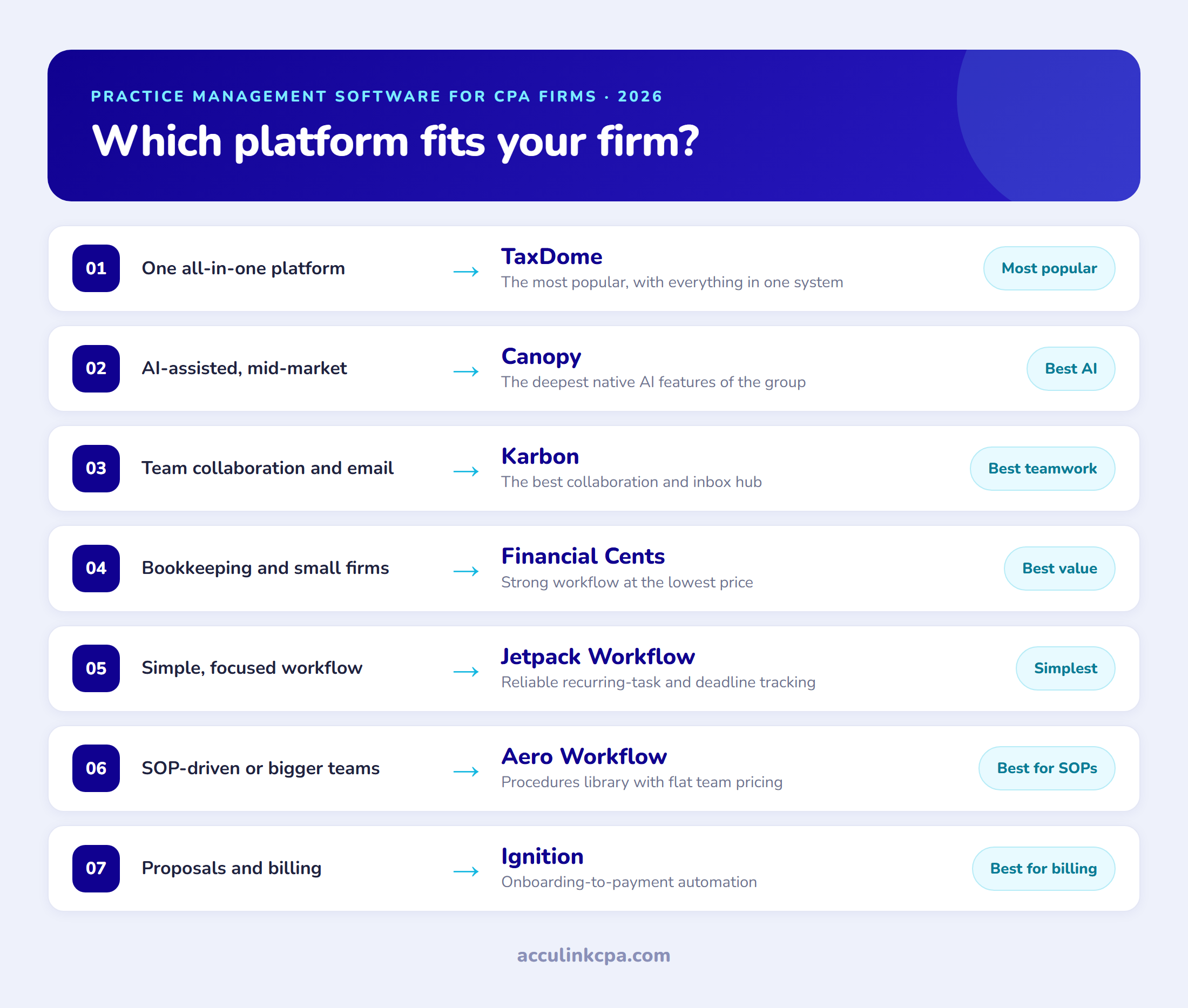
Best practice management software for each need
- Best overall and most popular: TaxDome
- Best AI features: Canopy
- Best for team collaboration: Karbon
- Best value: Financial Cents
- Best simple workflow: Jetpack Workflow
- Best for SOP-driven firms: Aero Workflow
- Best for proposals and billing: Ignition
The best accounting practice management software at a glance
Pricing models vary by provider. Some platforms charge per user, while others base their pricing on team size, client volume, or selected features. Check each vendor’s website for current pricing and contract terms.
| Software | Best for | Starting price |
|---|---|---|
| TaxDome | All-in-one for tax and bookkeeping firms at any size | Client-based subscription; see TaxDome pricing |
| Canopy | All-in-one with the strongest AI, mid-market | $74 to $149/user, plus add-ons |
| Karbon | Team collaboration and email, larger firms | $59 to $89/user |
| Financial Cents | Affordable workflow for bookkeeping and small firms | $19 to $69/user |
| Jetpack Workflow | Simple, focused deadline and workflow tracking | $40 to $50/user |
| Aero Workflow | Process-heavy firms that live in SOPs | $108 to $365/mo flat |
| Ignition | Proposals, engagement letters, and billing automation | Tiered monthly, from ~$49 |
Features compared
| Software | Type | Client portal | Billing | AI | Pricing model |
|---|---|---|---|---|---|
| TaxDome | All-in-one | Yes | Yes | Some | Subscription based on active client accounts |
| Canopy | All-in-one | Yes | Yes | Strong | Per user + add-ons |
| Karbon | Collaboration | Limited | Via add-on | Growing | Per user |
| Financial Cents | Workflow | Basic | Basic | Light | Per user |
| Jetpack Workflow | Workflow | No | No | No | Per user |
| Aero Workflow | Workflow | No | No | No | Flat, by team size |
| Ignition | Proposals and billing | Client-facing | Yes | No | Tiered plus per client |
The three leading platforms: TaxDome, Canopy, and Karbon
These are the three most-compared platforms and the ones most firms shortlist. TaxDome and Canopy are true all-in-one systems that try to do everything in one place; Karbon is the collaboration-first hub of the three. All three are comprehensive enough to run a firm on.
TaxDome: the most popular all-in-one
TaxDome is the most widely used practice management platform in the space, and it is the one most firms land on first. It bundles CRM, workflow automation, document management, a client portal and mobile app, secure messaging, e-signatures, and billing into a single system. TaxDome has moved to a simpler pricing model: there is no longer a per-user fee. With a single subscription plan, firms get all the tools they need to work with clients—without any extra costs for modules or integrations intended to compensate for missing features.
Strengths: An all-in-one platform with a polished client portal, bundled core tools, and a subscription model based on active client accounts rather than per-user fees.
Watch-outs: firms scaling well beyond a handful of staff, or those built around broad advisory rather than tax, sometimes find Canopy or Karbon more flexible for their workflow.
Best for: Firms that want a single system for client intake, document collection, e-signatures and billing that works alongside whichever tax software they already use, particularly mid-size and larger practices juggling high client volume.
Pricing: TaxDome uses a subscription model based on active client accounts, with no per-user fee. Visit the TaxDome pricing page for current pricing and plan details.
Canopy: the all-in-one with the best AI
Canopy is the other major all-in-one, and its differentiator in 2026 is native AI. It consolidates workflow, CRM, document management, billing, and client communication, and layers on AI tax features such as automated document collection, AI-assisted return preparation, and automated return delivery. It was named the top tax practice management product in G2's 2026 Best Software Awards, so it is a serious platform, not a niche player.
Strengths: the deepest built-in AI of the group, a strong all-in-one feature set, and three clear per-user tiers.
Watch-outs: the consumption-based add-ons. The per-user subscription is straightforward, but the tax-workflow, close-automation, and tax-resolution features bill separately by client or user on top, so the real cost climbs with usage.
Best for: growing and mid-market firms that want AI-assisted workflow and will use its add-on automations.
Pricing: three per-user tiers billed annually, Standard at $74, Plus at $109, and Premium at $149 per user per month, with tax-workflow and close-automation available as consumption-based add-ons on top.
Karbon: the best for team collaboration
Karbon takes a different approach: rather than an all-in-one, it is the best collaboration and workflow hub, built around email and teamwork. Its standout feature is a shared, email-integrated workspace that turns messages into tasks and keeps a whole team on the same page, which is why larger and more collaborative firms favor it.
Strengths: best-in-class team collaboration, excellent email and inbox management, and a clean, modern workflow engine.
Watch-outs: it is not all-in-one. You will likely pair it with separate tools for billing, document management, and client payments, which adds cost and integration work.
Best for: larger firms and teams where collaboration and email management are the priority.
Pricing: Team at $59 per user per month and Business at $89 per user per month, billed annually.
The workflow specialists: Financial Cents, Jetpack Workflow, and Aero Workflow
These focus on workflow rather than trying to be everything, and they pair with your other tools. They tend to win on price, simplicity, and speed of adoption.
Financial Cents: the value pick
Financial Cents is the affordable, no-nonsense option, built for bookkeeping firms and small accounting teams that want solid workflow and client management without a big price tag. It covers workflow automation, task and deadline tracking, client management, document requests, and time tracking, and it is consistently one of the cheapest credible options.
Strengths: the lowest entry price of the serious tools, an easy learning curve, and a feature set well matched to bookkeeping and small-firm work.
Watch-outs: it is lighter on advanced features and deep customization than the all-in-one platforms, so very large or complex firms may outgrow it.
Best for: bookkeeping firms and small accounting teams that want strong workflow at the best price.
Pricing: billed annually, Solo at $19, Team at $49, and Scale at $69 per user per month.
Jetpack Workflow: simple, focused workflow
Jetpack Workflow does one thing and does it well: recurring-task, deadline, and workflow tracking. It is not trying to be a full platform, which is exactly the appeal for firms that already have their other tools and just want reliable, repeatable workflow with nothing to learn.
Strengths: simple and quick to adopt, strong recurring-work and deadline tracking, and templates that get a firm running fast.
Watch-outs: limited beyond workflow. No client portal or all-in-one ambitions, so it works best as one piece of a stack.
Best for: firms that want dependable workflow tracking without a platform migration.
Pricing: Starter at $40 and Premium at $50 per user per month, billed annually.
Aero Workflow: for process-heavy firms
Aero Workflow pairs workflow management with a strong procedures and documentation library, so it suits firms that run on detailed standard operating procedures. Its pricing model is also different from the rest: it charges a flat monthly fee by team-size band rather than per user, which can be markedly cheaper for bigger teams.
Strengths: excellent for building and enforcing SOPs, and flat team pricing that scales well for larger headcounts.
Watch-outs: a more dated interface than the newer platforms, and less of a client-facing or all-in-one story.
Best for: process-driven firms that want documented procedures baked into their workflow, especially larger teams that benefit from flat pricing.
Pricing: flat team pricing on annual billing, from $108 per month for 1 to 5 users to $200 for 6 to 25 and $295 for 26 to 50 (monthly billing runs $135 to $365).
Beyond workflow: proposals and billing
Some firms find their real pain is not internal workflow but client onboarding, engagement letters, and getting paid. One tool leads that category.
Ignition: proposals, billing, and getting paid
Ignition is not a full practice management platform, and we include it because it owns a specific job the others handle less well: turning proposals and engagement letters into signed agreements and automated, recurring billing. If your pain is client onboarding, scope, and collections rather than internal workflow, it is the category leader.
Strengths: the best proposal-to-payment automation, clean engagement letters, and strong revenue and billing control.
Watch-outs: it is a complement, not a replacement, for workflow tools, and the higher tiers add per-client fees on top of the base price.
Best for: firms that want to automate onboarding, engagement letters, and billing, usually alongside a workflow tool.
Pricing: tiered monthly plans, starting in the range of $49 per month and rising through higher tiers that add per-client fees.
The comparisons firms run most
Most firms narrow it down to the big three all-in-one and collaboration platforms, so here are the direct verdicts.
TaxDome vs Canopy
Both are all-in-one platforms. Choose TaxDome if you want bundled practice management tools, a strong client portal, and pricing based on active client accounts rather than per-user fees. Consider Canopy if your priorities include its native AI features and configurable add-ons. Compare both platforms based on your firm’s workflows, client volume, team size, and total costs.
Karbon vs TaxDome
Different philosophies. Karbon wins for team collaboration, email management, and larger firms that will assemble a best-of-breed stack around it. TaxDome wins for firms that want one all-in-one platform with the client portal and billing built in. If email and teamwork are your center of gravity, Karbon; if consolidation is, TaxDome.
Karbon vs Canopy
Both suit larger, growing firms, so it comes down to what you value. Karbon leads on collaboration and email, but leans on separate tools for billing and documents. Canopy leads on all-in-one breadth and AI, keeping documents, billing, and workflow in one place. Pick Karbon for teamwork, Canopy for one AI-enabled platform.
How to choose
Match the tool to your firm, not the feature list.
- Tax and bookkeeping firms at any size: Consider TaxDome for an all-in-one platform with client-based subscription pricing, or Financial Cents if you prefer a focused workflow tool.
- Growing or mid-market, want AI: Canopy.
- Larger, collaboration-heavy: Karbon.
- You only need workflow: Jetpack Workflow, or Aero Workflow if you run on SOPs.
- Your pain is onboarding and billing: add Ignition to whatever workflow tool you use.
Two rules matter more than the grid. First, the best platform is the one your team will actually adopt, so weigh the learning curve and change management as heavily as features. Second, a practice management platform organizes and assigns the work, but it does not perform it. That distinction is the one most firms underestimate.
What we see in practice
Working with accounting firms on the delivery side, a few patterns show up again and again.
The tool rarely fails on features. It fails on adoption. Firms that pick a powerful platform and then do not invest in setup, templates, and training get a fraction of the value, and often blame the software for what is really a rollout problem. Budget for implementation, not just the subscription.
Consolidation is a preference, not a rule. Some firms are happiest with one all-in-one system; others get more from a lean workflow tool plus best-of-breed billing and documents. Neither is wrong, and switching platforms every year in search of perfect is more costly than committing to a good-enough one and configuring it well.
And the software only ever solves half the equation. Practice management software tells you what work is due, who owns it, and where it stands. It does not prepare the return, reconcile the books, or clear the review notes. The firms that scale smoothly pair a solid platform with enough capacity to do the work the platform is tracking, whether that is bookkeeping or tax preparation, which is increasingly an offshore team working inside the same system.
Where an offshore team fits in
Whatever platform runs your firm, the constraint is usually people, not software. A workflow board full of tasks still needs accountants to clear them, and hiring enough of them onshore is the exact bottleneck most firms are stuck on.
This is where Acculink CPA fits. We place offshore accountants who work directly inside your practice management system, whether that is TaxDome, Canopy, Karbon, or another, as part of your team: assigned tasks, tracked in your workflow, reviewed under your process. You keep the platform and the oversight; we provide the capacity to actually do the work it organizes, from full accounting outsourcing to specialized support, at a fraction of the cost of hiring onshore. Our guides to offshore accounting for CPA firms and choosing an offshore staffing partner go deeper, or you can build a dedicated team with us directly, and a 40-hour free trial lets you put accountants on real work first.
Frequently asked questions
What is the best accounting practice management software?
For most firms, TaxDome is the best all-around choice and the most popular, because it bundles workflow, documents, a client portal, and billing into one platform. Canopy is the best option for firms that want built-in AI, and Karbon is the best for team collaboration. The right pick depends on your firm's size and service mix.
What is practice management software for accountants?
It is software that runs the operational side of an accounting or CPA firm: tracking work and deadlines, assigning tasks, managing clients and documents, handling billing, and giving clients a portal. It organizes and standardizes how the firm delivers its services, separate from the tax or bookkeeping software that does the actual accounting.
How much does accounting practice management software cost?
Pricing depends on the platform and its billing model. Some providers charge per user, while others use team-based or client-based pricing. TaxDome bases its subscription on active client accounts and does not charge a per-user fee. Aero Workflow uses flat team pricing, while Ignition offers monthly plans with pricing that varies by plan and client volume. Check each provider’s website for current pricing and included features.
Is TaxDome better than Canopy?
For tax and bookkeeping firms that want bundled tools, a strong client portal, and pricing based on active client accounts, TaxDome is a strong option. Canopy may appeal to firms that prioritize its native AI features and configurable add-ons. Both are capable all-in-one platforms, so the right choice depends on your firm’s workflows, client volume, team size, and budget.
Which practice management software has the best AI?
Canopy leads on native AI, with features for automated document collection, AI-assisted return preparation, and automated return delivery built into its platform. The others are adding AI, but Canopy is the current front-runner among the all-in-one tools.
Do I still need accountants if I use practice management software?
Yes. Practice management software organizes, assigns, and tracks the work, but it does not perform it. You still need people to prepare returns, reconcile books, and clear reviews. Many firms pair a platform with an offshore team, such as an offshore accountant or bookkeeper, that works inside it to add that capacity affordably.
The bottom line
There is no single best accounting practice management software, only the best fit for your firm. TaxDome is the most popular and the safest all-in-one default. Canopy leads on AI, Karbon on collaboration, and Financial Cents and Jetpack Workflow on affordable, focused workflow, with Aero Workflow and Ignition covering process-heavy and billing-first needs. Pick the platform your team will adopt, invest in the rollout, and remember that the software only tracks the work. Having enough people to actually do it, onshore or offshore, is what turns a tidy workflow board into a firm that scales.
About the Author

Related Posts

Tax Preparation Outsourcing for CPA Firms: How It Works, What It Costs, and Where to Start (2026)
Tax preparation outsourcing lets a CPA firm hand routine return preparation to an external team, usually offsh…

Top 10 Offshore Staffing Companies for Accounting Firms (2026)
Hiring an offshore team is one of the highest-leverage moves a short-staffed CPA firm can make, but the partne…

Top Outsourced Accounting Firms for CPA Practices (2026)
Choosing an outsourced accounting partner is a high-stakes call because the team touches your clients' data. T…