CPA Firms Using ChatGPT, Copilot & Claude for Advisory and Reporting


Summary
CPA firms are actively using ChatGPT, Microsoft Copilot, and Claude for client advisory, management reporting, financial analysis, and internal operations — with measurable productivity gains across multiple use cases.
CPA Firms Using ChatGPT, Copilot & Claude for Advisory and Reporting
Key Takeaways
• CPA firms are actively using ChatGPT, Microsoft Copilot, and Claude for client advisory, management reporting, financial analysis, and internal operations — with measurable productivity gains across multiple use cases.
• ChatGPT excels at drafting client communications and tax research summaries; Copilot integrates into Excel and Outlook for financial modelling and email management; Claude handles long-form analysis, report writing, and complex document review.
• All AI tools hallucinate, lack access to real-time financial data, cannot verify IRS compliance, and produce outputs requiring qualified professional review before client delivery — making human oversight non-negotiable.
• The AI + Offshore + Human Review trifecta is the winning model: AI drafts and accelerates, offshore professionals prepare and verify, onshore CPAs review and deliver — maximising quality while minimising cost.
• Firms integrating AI alongside offshore capacity for compliance work position themselves to deliver higher-value advisory at better margins than firms relying on traditional domestic-only staffing.
Generative AI has moved from a curiosity to a daily-use tool in forward-thinking CPA firms across the country. Partners are using ChatGPT to draft client letters in minutes instead of hours. Staff accountants are using Microsoft Copilot to build financial models in Excel with natural language prompts. Managers are using Claude to analyse lengthy contracts, and summarise regulatory changes. They prepare advisory memos that would have taken a full day to write manually.
The AICPA has acknowledged that AI will fundamentally change accounting practice — and the Journal of Accountancy has published extensively on how firms are experimenting with these tools. The question for CPA firms in 2026 is no longer whether to use AI — it’s how to use it effectively, safely, and in combination with your team to maximise client value.
The firms getting this right understand three things. They know what each AI tool does best and where each tool fails dangerously. They also know how to combine AI capabilities with qualified human expertise — both onshore and through offshore staffing providers like Acculink CPA — to create a service delivery model that’s faster, cheaper, and better than any single approach alone.
This blog provides a practical, tool-by-tool guide for CPA firms using ChatGPT, Copilot, and Claude in 2026. It covers the limitations every practitioner must understand, and the three-layer trifecta model that combines AI, offshore talent, and in-house review for maximum impact.
The AI Tools CPA Firms Are Actually Using
The AI landscape for accounting professionals has matured significantly since ChatGPT first captured attention in 2023. Three generative AI platforms dominate CPA firm usage in 2026. Each has distinct strengths that make them complementary rather than redundant.
ChatGPT, developed by OpenAI, remains the most widely used generative AI tool among accounting professionals. Its strength lies in versatile text generation, research assistance, and conversational interaction. CPA firms use ChatGPT for drafting client communications, summarising tax code provisions, and generating engagement letter templates. They also use it for internal training materials and brainstorming advisory approaches. The GPT-4 model and subsequent iterations have improved accuracy in technical accounting content. But verification against primary sources like the Internal Revenue Code remains essential.
Microsoft Copilot has become the tool of choice for firms embedded in the Microsoft 365 ecosystem, which includes the vast majority of CPA practices. Copilot integrates directly into Excel, Word, Outlook, PowerPoint, and Teams. That lets professionals interact with AI within applications they already use daily. In Excel, Copilot generates formulas, creates pivot tables, builds financial models from natural language descriptions, and analyses datasets conversationally. In Outlook, it drafts emails, summarises threads, and suggests follow-up actions. For firms providing virtual CFO services and management reporting, Copilot’s Excel integration delivers directly billable productivity gains.
Claude, developed by Anthropic, has carved a distinct niche among CPA firms handling complex advisory work, lengthy document review, and detailed analytical writing. Claude’s particular strengths include processing very long documents (partnership agreements, trust instruments, regulatory filings). It generates nuanced analytical memos reflecting real-world accounting complexity, and maintaining consistency across long-form outputs. Firms providing FP&A services and complex tax planning advisory find Claude especially valuable for tasks requiring sustained analytical reasoning.
Beyond these three major platforms, CPA firms use specialised AI tools built for accounting. These include document extraction tools like SurePrep, workflow automation with embedded AI in practice management platforms, and analytics tools within QuickBooks and Xero. The common thread: every tool augments human capability rather than replaces it.
ChatGPT Use Cases in Accounting Firms
CPA firms have identified several high-value use cases for ChatGPT that deliver measurable time savings in daily operations, from client communication to internal knowledge management.
Client communication drafting is the most common use case. Tax season generates hundreds of emails, letters, and notifications — extension requests, missing document follow-ups, engagement letter updates, and advisory summaries. ChatGPT drafts these in seconds from brief prompts, reducing per-communication time from 15–30 minutes to 2–3 minutes of review and customisation. A firm sending 500 client communications during tax season reclaims 100+ hours through AI-assisted drafting alone.
Tax research assistance is popular but requires the most caution. Practitioners use ChatGPT for initial summaries of IRC sections, regulatory change implications, treatment comparisons for complex transactions, and relevant case law identification. The critical discipline: every output must be verified against primary sources — the IRS, Treasury Regulations, and authoritative guidance. ChatGPT confidently generates incorrect citations and fabricates rulings that don’t exist.
Internal training and knowledge management have emerged as an underappreciated use case. Firms create training materials for new staff, generate quiz questions for CPE sessions, and summarise complex topics for non-specialists. They also maintain internal knowledge bases. This is particularly valuable for firms with offshore team members who benefit from clear, well-written training documentation on firm-specific processes and preferences.
Engagement letter and proposal drafting deliver consistent time savings. Partners generating customised proposals use ChatGPT for initial drafts based on service scope descriptions. Then they refine the strategic and relationship-building elements requiring human judgment. For firms growing their outsourced bookkeeping or tax preparation practices, AI-assisted proposal generation accelerates business development.
Microsoft Copilot for Finance and Reporting
Copilot’s integration into Excel has been transformative for CPA firms doing significant financial modelling, management reporting, and data analysis.
In Excel, Copilot enables professionals to build financial models using natural language instead of formula construction. A prompt like “create a 12-month cash flow projection based on Column B revenue growing at 8% quarterly with fixed costs in Column C” generates a working model in seconds. For firms providing virtual CFO services or FP&A advisory, this acceleration translates directly to billable efficiency gains.
Data analysis becomes accessible to staff who aren’t Excel power users. Copilot generates charts, pivot tables, and summary statistics from conversational prompts. That democratises analytical capabilities. A junior accountant or offshore team member can produce client-ready visualisations that previously required advanced Excel expertise.
In Outlook, Copilot’s email management saves significant time during high-volume periods. Partners receiving 100+ emails daily use Copilot to summarise threads, draft responses, and prioritise messages — reclaiming an hour or more per day during tax season.
In Word, Copilot assists with report generation and formatting. Management reports, financial analysis memos, and client deliverables are drafted faster and formatted more consistently using templates and firm style guides.
The limitation: Copilot’s integration is only as strong as the Microsoft 365 data it can access. It doesn’t connect to tax software, practice management platforms, or external data sources unless specifically configured. Firms should view Copilot as a powerful productivity layer, not a comprehensive accounting AI solution.
Claude for Report Writing and Complex Analysis
Claude’s strengths in long-form analysis and document processing make it the preferred tool for firms handling advisory engagements, complex client situations, and management-level financial analysis.
For virtual CFO and FP&A engagements, firms use Claude to analyse client financial statements, identify trends and anomalies, and draft narrative analyses explaining numbers in business terms. Claude processes a full year of monthly financials, compares performance across periods, and generates draft management commentary. The partner then reviews and customises. What previously required 3–4 hours reduces to 30–45 minutes of review and refinement.
Contract and document review is another high-value application. Claude reads partnership agreements, operating agreements, trust instruments, and similar documents. It extracts key financial provisions and identifies accounting implications. For firms handling LLC formation, M&A support, or estate planning, this capability significantly reduces engagement onboarding time.
Regulatory analysis benefits from Claude’s ability to process lengthy texts. When new legislation passes or IRS guidance changes, Claude analyses provisions, identifies client-relevant impacts, and drafts memo summaries. Firms use this for timely client communications about changes like the One Big Beautiful Bill Act or IRS procedural updates.
The essential discipline: verification before delivery. Claude is remarkably capable but not infallible. Every AI-generated analysis must be reviewed by a qualified professional — whether you're an onshore CPA or an experienced offshore reviewer — before reaching a client. The time savings come from AI generating the first draft; professional expertise transforms the draft into a reliable deliverable.
Limitations and Risks of AI in Accounting
Every CPA firm exploring AI must understand the limitations clearly. Downside risks in accounting are significantly higher than in most other professional contexts. The AICPA has emphasised that AI does not change professional responsibilities — practitioners remain fully liable for the accuracy of their work regardless of the tools used.
Hallucination remains the most dangerous limitation. All generative AI models generate plausible-sounding but factually incorrect information. In tax contexts, this means fabricated IRC citations, incorrect regulatory interpretations, and inaccurate calculations presented with confidence. A partner relying on AI research without verification risks taking positions based on nonexistent authority — with consequences including client penalties, malpractice exposure, and professional discipline from state boards.
Data privacy is critical and often inadequately addressed. Inputting client financial data into AI tools may violate IRS §7216 if data is processed through cloud servers without adequate protections. Enterprise AI versions with data processing agreements are preferable to consumer tools for any client-related work. Acculink CPA’s IT and data security framework ensures all data handling meets IRS requirements. That holds regardless of whether AI tools are part of the workflow.
Professional liability is not transferred to AI. Under IRC §6694, the practitioner who signs a return or delivers advice bears full responsibility. AI tools are instruments; the professional is the responsible party. This legal reality is why qualified human review — by both offshore professionals at the preparation layer and onshore CPAs at the review layer — remains indispensable.
The bottom line: AI tools are powerful productivity accelerators within a workflow that includes qualified human review at every stage. They become liability risks when treated as substitutes for professional judgment.
The AI + Offshore + Human Review Trifecta
The most effective service delivery model in CPA firms in 2026 isn’t pure AI, pure domestic, or pure offshore — it’s the three-layer trifecta combining each approach’s strengths while compensating for individual weaknesses.
Layer 1: AI for acceleration and first-draft generation. AI handles time-consuming initial work — data extraction, transaction categorisation, communication drafting, preliminary analysis, and research starting points. This reduces per-task time by 30–60% compared to fully manual approaches. That creates capacity that flows to the human layers.
Layer 2: Offshore professionals for preparation, verification, and production. Qualified professionals through Acculink CPA — including tax preparers, bookkeepers, accountants, and financial analysts — take AI-accelerated drafts and produce verified, accurate, production-quality deliverables. They check AI outputs against source documents and primary authorities. They prepare returns in your software, build financial statements, and produce reports meeting your quality standards. This layer costs $8–$35/hour versus $55,000–$80,000+ for equivalent domestic hires.
Layer 3: In-house CPA review, advisory, and judgment. Your onshore partners focus exclusively on the work requiring a licensed professional’s judgment — reviewing deliverables, making strategic recommendations, building client relationships, and providing advisory services commanding premium billing rates.
Firms using this trifecta report 40–60% capacity increases without adding domestic headcount, 30–50% turnaround improvements, and significant margin expansion. The Bureau of Labour Statistics salary data confirms the economic logic. AI reduces data processing time, offshore professionals handle preparation at a fraction of domestic cost, and partners are freed for $300–$500/hour advisory work.
The firms dominating the next decade of accounting are building this trifecta now. Every month of delay is a month where competitors get faster, cheaper, and better while your firm operates on a single-layer model that can’t match their economics.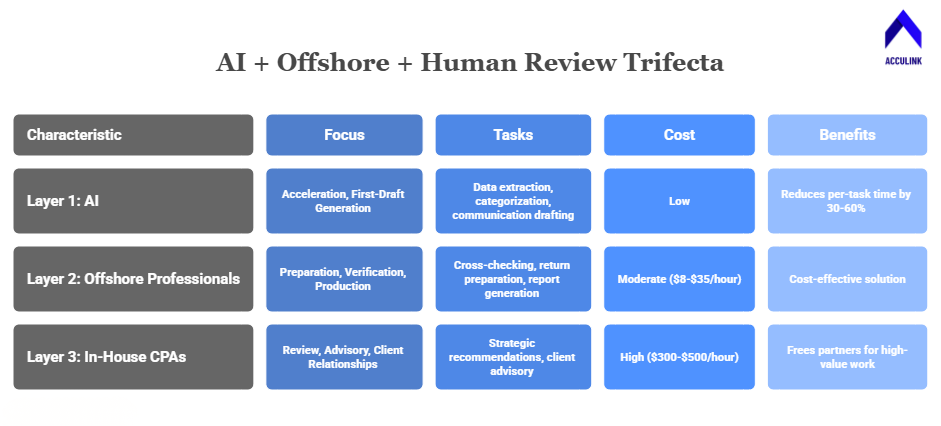
Frequently Asked Questions
Which AI tool is best for CPA firms?
No single best tool — each excels differently. ChatGPT for drafting and research. Copilot for Excel and Outlook integration. Claude for long-form analysis. Most firms benefit from using all three for their respective strengths.
Is it safe to put client data into AI tools?
Enterprise versions with data processing agreements provide stronger protections than consumer versions. Evaluate IRS §7216 compliance. Avoid consumer-grade AI for client data. Acculink CPA’s security framework ensures compliance regardless of AI tool usage.
Can AI replace my advisory team?
No. AI accelerates advisory work by generating drafts and conducting preliminary analysis. But judgment, client relationships, and strategic recommendations require experienced professionals. AI frees time for advisory; it doesn’t perform advisory.
How do offshore teams work with AI tools?
Offshore professionals at Acculink CPA are trained on the same software and tools your firm uses. They use AI-generated drafts as starting points, verify accuracy against source documents, and produce finalised deliverables following your quality standards.
What’s the ROI of combining AI with offshore staffing?
Firms report 30–50% time savings from AI and 60–75% cost savings from offshore staffing versus domestic-only models. Combined, the trifecta model can improve firm profitability by 25–40% while increasing total capacity significantly.
References
OpenAI (ChatGPT) — ChatGPT (OpenAI)
Microsoft Copilot — Microsoft Copilot
Anthropic (Claude) — Anthropic (Claude)
American Institute of CPAs (AICPA) — American Institute of CPAs (AICPA)
IRS Section 7216 Information Centre — IRS Section 7216 Information Center
Internal Revenue Code — Cornell Law — Internal Revenue Code (26 U.S. Code)
Journal of Accountancy — Journal of Accountancy
Bureau of Labour Statistics — U.S. Bureau of Labor Statistics
About Acculink CPA
Acculink CPA is a premier offshore staffing and outsourcing company purpose-built for CPA firms, accounting firms, and tax firms in the United States, Canada, and the UAE. With a team of 300+ qualified professionals — including CPAs, Chartered Accountants, Enrolled Agents, and Big 4-trained staff — Acculink provides dedicated offshore accountants, bookkeepers, tax preparers, auditors, virtual CFOs, and virtual assistants at $8–$35/hr, delivering up to 75% cost savings compared to domestic hiring. The company is ISO 27001 certified, SOC 2 Type II aligned, IRS §7216 compliant, and GDPR compliant, with zero security breaches in 5+ years of operations. Acculink offers a 40-hour free trial with no setup fees, no recruitment charges, and no long-term contracts. Over 80 CPA firms across the United States trust Acculink to deliver quality, security, and scalability.
Website: Acculink CPA | Schedule a Call: book a 45-minute call | Email: Info@acculinkcpa.com | Phone: +1 (203) 997-0224
Tags:
About the Author

Related Posts

Hire Offshore Bookkeepers for CPA & Accounting Firms – Blueprint for Outsourced Bookkeeping
How to hire an offshore bookkeeper for your CPA firm — what they do, how vetting and onboarding work, cost (up…
Hire Offshore Accountants for CPA & Accounting Firms – Why Outsourced Accounting Works
How to hire an offshore accountant for your CPA firm — month-end close, GL, GAAP reporting, in your software —…
15 Profitable Add-On Services CPA and Accounting Firms Can Offer Without Hiring In-House
CPA and accounting firms do not need to build every new service with another in-house hire. This guide compare…