QuickBooks Online vs Xero vs Sage vs FreshBooks vs Zoho Books: 2026 Accounting Software Comparison for CPA Firms

Summary
For most US CPA firms and their clients, QuickBooks Online is still the safe default. Xero is the strongest alternative for unlimited users and multi-currency, FreshBooks fits invoicing-first service businesses, Zoho Books and Wave win on price with genuine free tiers, and Sage covers the extremes from micro to enterprise. This guide compares all six on 2026 pricing, features, and day-to-day CPA firm fit, so you can match each client to the right platform and the right person to run it.
Quick answer: For most U.S. CPA firms and the clients they serve, QuickBooks Online is still the safe default, because nearly every accountant, app, and bookkeeper already works in it. Xero is the strongest alternative when a client needs unlimited users or serious multi-currency support. FreshBooks fits freelancers and service businesses that live in their invoicing. Zoho Books and Wave win on price, each with a genuinely free tier for very small clients. Sage covers the extremes: cheap and basic at the bottom with Sage Accounting, or enterprise-grade at the top with Sage Intacct. The right answer depends on the client, and most firms end up supporting two or three of these rather than one.
This guide compares the leading accounting software for accountants and the CPA firms they run, on price, features, and day-to-day fit, so you can match each client to the right platform and the right person to run it.
Key takeaways
- There is no single best platform, only the best fit for a given client's size, complexity, and industry. Most firms standardize on one primary system and keep a second for the clients who need it.
- QuickBooks Online is the default for U.S. small businesses and the easiest to staff. Xero wins on unlimited users and multi-currency. FreshBooks owns invoicing-first service businesses. Zoho Books and Wave win on price. Sage serves micro clients or mid-market multi-entity firms.
- Pricing moved in 2026. QuickBooks Online raises prices again on August 1, and several older comparison articles still show last year's numbers. The figures below are current as of late July 2026.
- Every platform here is cloud based, so a trained bookkeeper can run it from anywhere. That makes the harder question not which software, but who runs it once you sign the client.
At a glance: 2026 pricing and fit
Pricing is current U.S. pricing as of late July 2026. QuickBooks Online raises its prices on August 1, 2026, so the mid and top tiers are higher after that date.
| Platform | Starting price / month | Users | Best for |
|---|---|---|---|
| QuickBooks Online | $38 Simple Start (Solopreneur $20) | 1 to 25 | The default for most U.S. firms and clients |
| Xero | $25 Early | Unlimited on every plan | Multi-user and multi-currency clients |
| FreshBooks | $23 Lite | 1, fee per extra user | Freelancers and service businesses |
| Zoho Books | Free under $50K revenue, then $15 | 1 to 15 | Cost-conscious clients in the Zoho ecosystem |
| Wave | Free, or $16 Pro | 1 | The smallest clients and side businesses |
| Sage | Sage Accounting from about $10; Intacct by quote | Varies | Micro clients, or mid-market multi-entity |
Features side by side
| Capability | QuickBooks Online | Xero | FreshBooks | Zoho Books | Wave | Sage |
|---|---|---|---|---|---|---|
| Users | 1 to 25 | Unlimited | 1 (+fee) | 1 to 15 | 1 | Varies |
| Multi-currency | Good | Excellent | Limited | Good | Limited | Limited (Accounting) |
| Inventory | Plus tier and up | Via add-on | No | Built in | No | Limited |
| Payroll | Built in (add-on) | Via Gusto | Add-on | Zoho Payroll | Add-on | Sage Payroll |
| App ecosystem | Largest in the U.S. | Very large, global | Modest | Deep in Zoho only | Small | Small |
| AI tooling | Most developed | Growing | Light | Automation focused | Minimal | Light |
| Best for | Most firms and clients | Multi-user, multi-currency | Service businesses | Value, Zoho users | Micro clients | Micro, or enterprise |
Every one of these is cloud based, which means an offshore or remote bookkeeper can work in it as easily as someone in the next room. That single fact is why the "which software" debate matters less than it used to, and why the "who runs it" question matters more.
QuickBooks Online
QuickBooks Online is the most widely used small-business accounting platform in the United States, and it is not close. For a CPA firm that translates into three practical advantages: almost every client you onboard already uses it, almost every app you might need connects to it through one of the largest marketplaces in the category, and almost every bookkeeper you hire, onshore or offshore, already knows it.
2026 pricing: Solopreneur $20, Simple Start $38, Essentials $75, Plus $115, Advanced $275 per month. On August 1, 2026, Essentials moves to $85, Plus to $140, and Advanced to $340. Inventory and project profitability begin at the Plus tier.
Strengths: the deepest set of accountant tools through QuickBooks Online Accountant, the widest app ecosystem, reliable bank feeds, and reporting that becomes genuinely powerful at the Advanced tier.
Watch-outs: price increases have become an annual event, lower tiers cap the number of users, and support quality is uneven. Highly customized businesses can outgrow it.
Best for: the majority of U.S. small-business clients, and any firm that wants to standardize on one system its whole team already knows.
Xero
Xero is the platform most firms reach for when QuickBooks does not fit. Its defining advantage is that every plan includes unlimited users, so a client with a bookkeeper, an office manager, an outside CPA, and an offshore team member does not pay per seat. It also handles multi-currency well and has a clean interface that clients tend to like.
2026 pricing (U.S.): Early $25, Growing $55, Established $90 per month. Xero uses these U.S. plan names, so any comparison still listing "Starter, Standard, Premium" is out of date.
Strengths: unlimited users on every plan, strong multi-currency, a large global app ecosystem, and Xero HQ for practice management.
Watch-outs: a smaller U.S. footprint means fewer U.S.-specific integrations and a smaller local talent pool, and its reporting trails QuickBooks Advanced.
Best for: clients with international operations, several users, or a preference for a cleaner interface. Firms serving global clients often standardize on Xero for that segment.
FreshBooks
FreshBooks was built around invoicing and time tracking, and it is still the best in that lane. For a service business, a consultant, or a freelancer who bills by the hour, it is often more pleasant to use than a full accounting suite. It fits product businesses and deep reporting needs less well.
2026 pricing: Lite $23, Plus $43, Premium $70 per month, with a custom Select tier. FreshBooks frequently runs a steep introductory discount, so confirm the ongoing price with clients, not the promo rate.
Strengths: best-in-class invoicing, built-in time tracking and project management, and a clean interface.
Watch-outs: limited inventory, thinner accountant tooling than QuickBooks or Xero, and full double-entry features concentrated on higher tiers.
Best for: freelancers, consultants, agencies, and other service businesses where invoicing is the center of gravity.
Zoho Books
Zoho Books is the value pick, and it is more capable than its price suggests. The standout feature for a firm is the genuinely free plan for clients under $50,000 in annual revenue, which makes it easy to put very small clients on a real system at no cost. It grows stronger the deeper a client sits in the wider Zoho ecosystem of CRM, inventory, and payroll.
2026 pricing (billed annually): Free under $50K revenue, then Standard $15, Professional $40, Premium $60, Elite $120, Ultimate $240 per month. Monthly billing runs a few dollars higher per tier.
Strengths: aggressive pricing, strong automation and workflows, good multi-currency, and tight integration across Zoho apps.
Watch-outs: a smaller U.S. user base, a less developed accountant partner program, and fewer bookkeepers who specialize in it, which matters for staffing.
Best for: cost-conscious small businesses, especially those already using Zoho tools.
Wave
Wave earns its place because your smallest clients keep asking about it, and because it is genuinely free for core accounting and invoicing. For a side business, an early startup, or a lean nonprofit, Wave covers the basics without a subscription.
2026 pricing: Starter is free. Pro is $16 per month billed annually, or $19 monthly, and adds automatic bank imports and unlimited receipt scanning. Payroll is a separate add-on starting around $40 per month plus a per-employee fee.
Strengths: a real free tier, simple invoicing, and a low barrier to getting a micro client onto a system.
Watch-outs: it syncs with only a small number of outside apps, has limited room to scale, and offers thin support. Clients tend to outgrow it, which is often the moment a firm moves them to QuickBooks or Xero.
Best for: the smallest clients and pre-revenue businesses that will graduate to a paid platform later.
Sage
Sage is really two products for two different clients. Sage Accounting (formerly Sage Business Cloud Accounting) starts around $10 per month and suits micro-businesses with simple needs, though it is light on integrations and does not connect to payroll the way the others do. At the other end, Sage Intacct is enterprise-grade financial management with multi-entity consolidation, advanced revenue recognition, and dimensional reporting. It is quote-based and typically runs from roughly $15,000 into six figures per year.
Best for: micro clients that want something cheap and simple (Sage Accounting), or mid-market and multi-entity clients that have outgrown QuickBooks and Xero (Sage Intacct, usually at $5M or more in revenue).
The match-ups firms actually search
Most people do not compare five platforms at once. They compare two. Here is the short, honest verdict on the pairings that come up most.
QuickBooks Online vs Xero
The core decision for most firms. Choose QuickBooks for the deepest U.S. app ecosystem, the largest talent pool, and the strongest accountant tools. Choose Xero when a client needs unlimited users without paying per seat, or when multi-currency and a cleaner interface matter more than ecosystem depth. Many firms run both: QuickBooks as the house standard, Xero for the clients who need it.
FreshBooks vs QuickBooks
Different tools for different jobs. FreshBooks wins for a solo service provider who mostly needs to send professional invoices, track time, and get paid. QuickBooks wins the moment that business needs real inventory, deeper reporting, or a bookkeeper running full-cycle accounting. If a client is scaling, QuickBooks is the platform they grow into.
Wave vs QuickBooks
A budget question. Wave is free and fine for a very small or pre-revenue business. QuickBooks costs money but scales, integrates, and is understood by every accountant and app. The usual pattern is Wave first, QuickBooks once the business has revenue and complexity.
Zoho Books vs QuickBooks
Zoho Books offers a comparable feature set at a lower price, with a free tier QuickBooks cannot match. QuickBooks answers with a far larger U.S. app ecosystem and a much deeper pool of bookkeepers who know it. For a Zoho-native client, Zoho Books is a strong pick. For most others, QuickBooks is the lower-friction choice.
AI features: where these platforms stand in 2026
This is the fastest-moving part of the comparison, so treat it as a snapshot rather than a settled verdict. QuickBooks has pushed hardest, with automated categorization, anomaly detection, cash-flow forecasting, and an AI assistant woven through the higher tiers. Xero has rolled out its own assistant and smart reconciliation. Zoho Books leans on automation and a scripting layer for firms that want custom rules. FreshBooks, Wave, and Sage Accounting are lighter on AI so far.
The honest takeaway: AI features are a real tiebreaker between QuickBooks and Xero at the top of the market, but they should not override price, fit, and who on your team will run the software. A capable AI assistant does not replace a trained bookkeeper who knows how your firm works. It makes that person faster.
What we see in practice
Placing offshore accounting staff across a range of firms, a few patterns repeat often enough to plan around.
Firms rarely standardize on one platform, and the ones that try to support all six well are usually the ones whose quality slips. The efficient setup is one house standard, most often QuickBooks, plus a second platform such as Xero for the clients who genuinely need it.
Clients migrate upward on complexity, not price. A business on Wave or FreshBooks moves to QuickBooks when it adds inventory, hires staff, or takes on a lender who wants real financial statements. The monthly fee is almost never the trigger, which is why leading with "cheaper software" rarely wins the engagement.
The talent pool is lopsided. Nearly every bookkeeper is fluent in QuickBooks. Fewer specialize in Xero, and fewer still in Zoho Books. A firm that standardizes on a less common platform has to plan for staffing rather than assume it, because the person who runs the software well is harder to find than the software.
The first season after a switch is slower, not faster. Migrating a client's file, chart of accounts, and integrations costs time before it saves any. The firms that handle it well move clients in the off-season and never mid-close.
And cloud access is the quiet enabler behind all of it. When the platform lives in the browser, an offshore team member works in the same file, with the same permissions and the same audit trail, in real time. Desktop-bound setups add a layer that cloud platforms simply remove.
Keeping client data safe across these platforms
Because every platform here holds sensitive client financial data in the cloud, the real safeguard is not the brand of software but how access is controlled. Three habits matter more than any feature checkbox: give each team member their own login rather than sharing credentials, use role-based permissions so people see only what they need, and remove access the day someone rolls off the account. This matters doubly when part of the work runs through an offshore team. A reputable offshore staffing partner will already work this way, with named users, scoped permissions, and clean offboarding, so client data is protected the same whether the person sits in your office or across the world.
How to choose the right platform for your clients
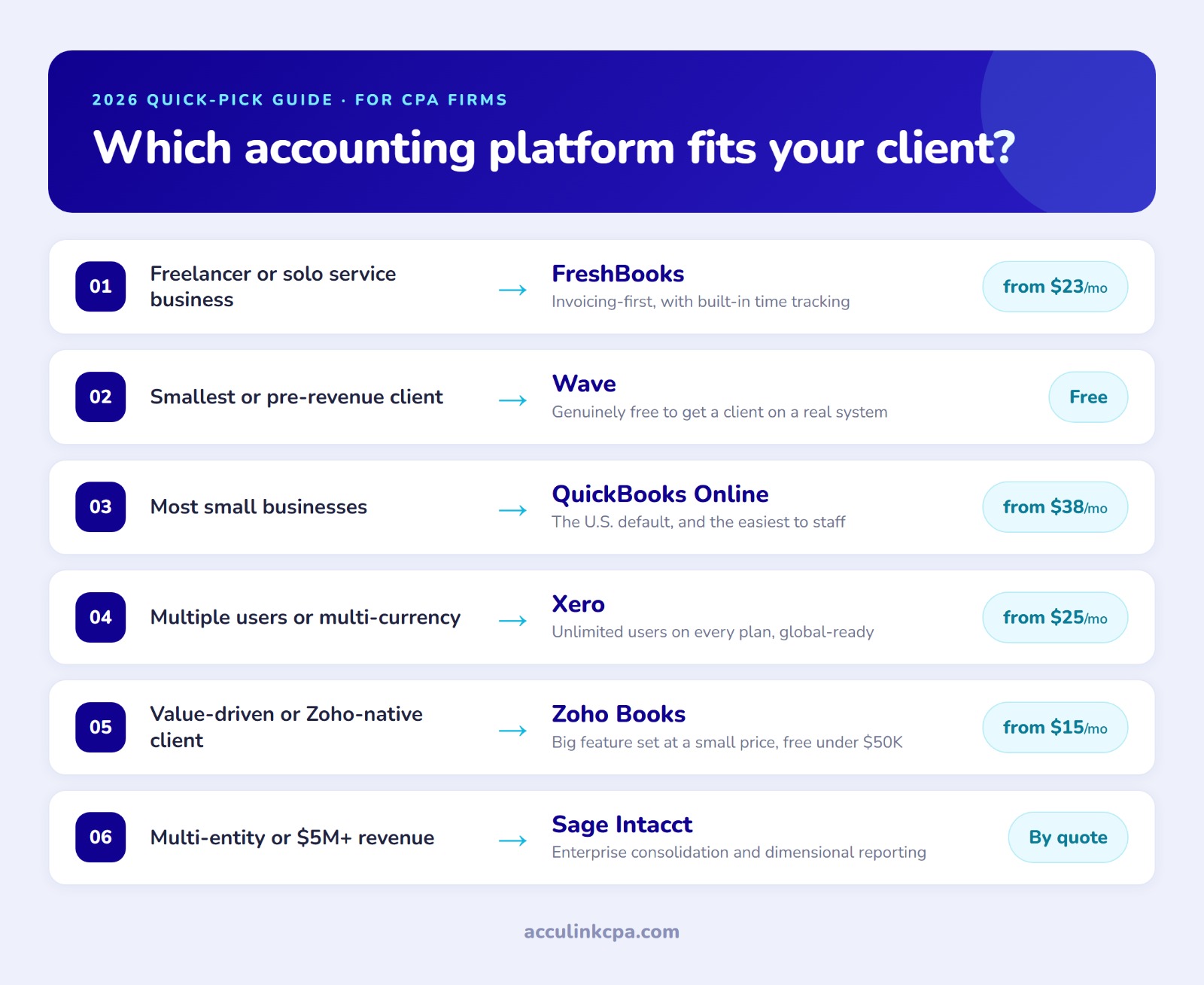
A simple way to decide, by client type:
- Simple service business or freelancer: FreshBooks, Zoho Books free tier, or Wave.
- Standard small business with inventory: QuickBooks Online Plus, Xero with an inventory app, or Zoho Books.
- Multiple users or multi-currency: Xero, for the unlimited users and currency handling.
- Cost is the deciding factor: Zoho Books or Wave.
- Multi-entity or $5M-plus revenue: Sage Intacct.
Two principles matter more than the grid. First, standardize where you can, because a firm running one or two primary platforms is far more efficient than one supporting six. Second, choose with staffing in mind. The best platform for a client is one your team, including any offshore staff, can actually run well.
How these platforms work with an offshore bookkeeping team
This is where software choice connects to how a firm actually grows. Because every platform above is cloud based, a trained bookkeeper can run it from anywhere, which is what makes an offshore team practical in the first place. A staff accountant in India or the Philippines works inside the same QuickBooks or Xero file as your U.S. team, in real time, with the same permissions and the same audit trail.
The catch is proficiency. A platform is only as good as the person running it, and the talent pools are not the same size. Many bookkeepers are fluent in QuickBooks. Fewer specialize in Xero, and fewer still in Zoho Books. If you standardize on a less common platform, you have to make sure whoever staffs it, in-house or outsourced, genuinely knows it.
This is where a staffing partner matters. Acculink CPA places accounting professionals already trained on QuickBooks, Xero, Sage, and Zoho Books, so your platform choice is not limited by who you can hire locally. You pick the software that fits the client, and the trained person to run it comes with it, at a cost well below a comparable domestic hire. A 40-hour free trial lets you put a platform-trained bookkeeper on real work before you commit.
Pricing summary
Current U.S. entry pricing as of late July 2026:
- QuickBooks Online: $38 to $275 per month (rises August 1, 2026)
- Xero: $25 to $90 per month
- FreshBooks: $23 to $70 per month, plus custom
- Zoho Books: free under $50K revenue, then $15 to $240 per month
- Wave: free, or $16 per month for Pro
- Sage: Sage Accounting from about $10 per month; Sage Intacct by quote
Always confirm current pricing on the vendor's own site before quoting a client, since these change often and most vendors run introductory promotions that expire.
Frequently asked questions
Which is better for CPA firms: QuickBooks Online or Xero?
QuickBooks Online has the largest U.S. market share, the broadest app ecosystem, and the deepest accountant tools, which is why most U.S. firms use it as their standard. Xero counters with unlimited users on every plan, stronger multi-currency support, and a cleaner interface. Many firms standardize on QuickBooks and use Xero for specific client segments, such as those with international operations.
What is the cheapest accounting software for a small business?
Wave and Zoho Books both offer a free tier for very small businesses, with Zoho Books free for clients under $50,000 in annual revenue. Among paid platforms, Sage Accounting at around $10 per month and Zoho Books Standard at $15 per month are the lowest starting points.
Which accounting software do most small businesses use?
QuickBooks Online holds the largest share of the U.S. small-business market by a wide margin, which is also why it is the easiest platform to find an experienced bookkeeper for. Xero is the most common alternative, and it leads in several markets outside the United States.
Is Zoho Books a serious competitor to QuickBooks?
For cost-conscious small businesses, yes. Zoho Books offers a comparable feature set at a lower price, including a free plan. Its main limitations for a firm are a smaller U.S. app ecosystem and a smaller pool of bookkeepers who specialize in it.
Which accounting software is best for multiple users?
Xero, because it includes unlimited users on every plan at no extra cost. QuickBooks Online limits users by tier, so a growing team can be pushed into a more expensive plan just to add seats.
When should a client move to Sage Intacct?
Typically when they pass roughly $5 million in revenue, add multiple entities, or need advanced revenue recognition and dimensional reporting that QuickBooks and Xero cannot handle well.
Can offshore bookkeepers work in any of these platforms?
Yes. All of these are cloud based, so a trained bookkeeper can work in them from anywhere in real time. The practical limit is proficiency, not geography. A staffing partner like Acculink CPA places professionals already trained on QuickBooks, Xero, Sage, and Zoho Books, so your platform choice is not limited by local hiring.
How much does cloud accounting software cost per month?
It ranges from free (Wave, and Zoho Books under $50K revenue) to $275 or more per month for QuickBooks Online Advanced. Xero runs $25 to $90, and FreshBooks runs $23 to $70. Sage Intacct is enterprise software priced by quote.
The bottom line
There is no single best accounting platform, only the best fit for a given client and a firm that can staff it. QuickBooks Online remains the default for good reasons. Xero is the strongest alternative. FreshBooks, Zoho Books, and Wave each win a specific slice, and Sage covers the extremes. Pick the platform that fits the client, standardize where you can, and make sure whoever runs it, in-house or offshore, is trained on it. If growth is the goal, that last part is the real constraint, and it is the one a platform-trained offshore team is built to solve.
Tags:
About the Author

Related Posts
Top Outsourced Accounting Firms for CPA Practices (2026)
Choosing an outsourced accounting partner is a high-stakes call because the team touches your clients' data. T…
Top 10 Offshore Staffing Companies for Accounting Firms (2026)
Hiring an offshore team is one of the highest-leverage moves a short-staffed CPA firm can make, but the partne…
Top Tax Software Platforms for CPA Firms (2026): CCH vs UltraTax vs Lacerte vs Drake
There is no single best tax software for CPA firms, only the best fit for your return mix, firm size, and staf…