AI in Accounting: How Artificial Intelligence Is Transforming CPA Firms in 2026

Summary
AI is transforming accounting operations — from data extraction and bank reconciliation to audit analytics and advisory dashboards — but it is augmenting human professionals, not replacing them.
Key Takeaways
-
AI is transforming accounting operations — from data extraction and bank reconciliation to audit analytics and advisory dashboards — but it is augmenting human professionals, not replacing them.
-
CPA firms that combine AI-powered tools with skilled human teams (including offshore professionals) will outperform firms that rely on AI alone or ignore it entirely.
-
The most impactful AI applications in accounting today are data extraction from source documents, automated bank reconciliation, anomaly detection in audit, and natural language querying of financial data.
-
AI has real limitations in accounting: it cannot exercise professional judgment, navigate ambiguous tax positions, manage client relationships, or take legal responsibility for filed returns.
-
The winning formula for CPA firms in 2026 is AI for speed and pattern recognition + skilled human professionals for judgment and quality + offshore teams for capacity and cost efficiency.
If you’re a CPA firm partner in 2026, you can’t go a week without hearing about AI. Every conference panel, every vendor pitch, every industry publication is talking about how artificial intelligence will “revolutionise” accounting. ChatGPT can draft tax memos. AI tools can extract data from W-2s in seconds. Machine learning algorithms can flag anomalies in audit workpapers that humans might miss.
The hype is real — and so are the legitimate applications. But so is the noise. Between vendors overselling capabilities, partners worried about obsolescence, and staff wondering if AI will take their jobs, it’s hard to separate signal from noise.
This guide cuts through the hype. We’ll cover what AI can actually do in accounting today, where it falls short, the specific tools CPA firms are using, and — critically — how AI intersects with your staffing strategy. Because the most successful firms aren’t choosing between AI and human talent. They’re combining both, using AI to amplify the productivity of their teams — including offshore professionals from providers like Acculink CPA.
As the management theorist W. Edwards Deming observed, “The greatest waste is the failure to use the abilities of people.” AI’s role in accounting is to eliminate the waste — the manual data entry, the repetitive reconciliation, the routine pattern matching — so that human professionals can focus on what only humans can do: judgment, relationships, and strategic advice.
What AI Can Actually Do in Accounting Today
Let’s start with what’s real. AI in accounting isn’t science fiction — it’s a set of specific tools performing specific tasks, most of which fall into a few categories.
Data Extraction and Document Processing
This is the single most impactful AI application in accounting right now. AI-powered OCR (optical character recognition) and machine learning models can extract data from W-2s, 1099s, K-1s, bank statements, invoices, and receipts with remarkable accuracy. Tools like Botkeeper, Dext, and Hubdoc use AI to read documents, categorise transactions, and populate accounting or tax software automatically.
What used to take a staff accountant 30 minutes per document now takes seconds. For CPA firms processing thousands of returns during tax season, the time savings are enormous. But — and this is critical — extraction accuracy is not 100%. AI gets the easy cases right almost always, but still struggles with handwritten documents, unusual formatting, and multi-page K-1s with complex allocations. Human review remains essential.
Automated Bank Reconciliation
AI-powered reconciliation tools in platforms like QuickBooks Online, Xero, and Sage match bank transactions to accounting entries automatically, learning from historical patterns to improve accuracy over time. For bookkeeping teams handling multiple clients, this reduces reconciliation time by 50–70%.
The AI handles the straightforward matches — recurring vendor payments, payroll deposits, and standard client receipts. The human bookkeeper focuses on exceptions, unmatched transactions, and unusual items that require judgment. This is the pattern you’ll see repeatedly: AI handles the volume; humans handle the exceptions.
Anomaly Detection in Audit
Audit analytics platforms like MindBridge and CaseWare IDEA use machine learning to analyse entire data populations (not just samples) and flag anomalies — unusual transactions, statistical outliers, patterns that deviate from expected behaviour. This is a genuine step change from traditional sampling-based audit procedures.
For audit teams, AI doesn’t replace the auditor’s judgment about whether an anomaly represents a material misstatement — but it dramatically expands the auditor’s ability to find anomalies in the first place. An AI can scan 500,000 transactions in minutes; a human team would need weeks.
Natural Language Querying of Financial Data
Tools like ChatGPT, Microsoft Copilot, and dedicated accounting AI assistants now allow users to query financial data using natural language: “What was our client’s revenue growth rate by quarter last year?” or “Show me all vendor payments over $10,000 in Q3.” This makes financial analysis accessible to non-technical partners and clients.
This capability is evolving rapidly, but today it works best for structured queries against clean data. Complex analytical questions still require a trained financial professional to interpret context, identify data limitations, and draw meaningful conclusions.
Drafting and Summarisation
Large language models (LLMs) like ChatGPT and Claude can draft tax memos, summarise complex regulations, generate client-facing reports, and produce first-draft management commentary for financial statements. These tools save significant time on writing-intensive tasks.
But the drafts require professional review. AI-generated tax memos can contain hallucinated citations (references to regulations or rulings that don’t exist), miss nuances in client-specific situations, and fail to account for recent guidance. The draft is a starting point, not a deliverable.
What AI Cannot Do in Accounting (And May Never Do Well)
Understanding AI’s limitations is just as important as understanding its capabilities. Here’s where AI falls short in accounting today — and where human professionals remain irreplaceable.
Professional Judgment on Tax Positions
Tax preparation involves judgment calls at every step: whether to take an aggressive or conservative position, how to structure a transaction for tax efficiency, whether a deduction is supportable under audit, and how to interpret ambiguous guidance. AI can surface options and cite regulations, but it cannot exercise the professional judgment that determines the right answer for a specific client in a specific situation.
Client Relationship Management
Clients don’t call their CPA firm because they want an AI chatbot. They call because they trust their advisor’s judgment, value the personal relationship, and need someone who understands their business holistically. AI can help you prepare for the client meeting (by generating data summaries and analysis), but it cannot replace the meeting itself.
Complex, Ambiguous Scenarios
The most valuable work CPA firms do involves complexity and ambiguity: multi-entity restructuring, cross-border tax planning, business valuations, litigation support, and M&A advisory. These scenarios involve incomplete information, competing stakeholder interests, and judgment calls where reasonable professionals might disagree. AI struggles fundamentally with this type of work.
Legal and Ethical Responsibility
A CPA firm signs off on tax returns, audit opinions, and financial statements. That signature carries legal and ethical responsibility. AI cannot be held responsible, cannot be sued, and cannot face professional discipline. The human professional remains the accountable party — and that accountability is what clients are paying for.
Contextual Understanding of Clients
A skilled tax preparer who has worked with a client for three years knows their business, their risk tolerance, their life circumstances, and their long-term goals. They remember that the client is planning to sell their business next year, that they have a child starting college, or that they’re going through a divorce that affects filing status. AI has no contextual memory of this kind — and even if it did, it couldn’t use it with the empathy and discretion that human professionals bring.
AI Tools CPA Firms Are Using in 2026
Here’s a practical overview of the AI tools gaining traction among U.S. CPA firms, categorised by function.
Data Extraction and Document Processing
-
Botkeeper: AI-powered bookkeeping platform that automates transaction categorisation, reconciliation, and reporting. Popular among CPA firms offering bookkeeping as a service.
-
Dext (formerly Receipt Bank): Extracts data from receipts, invoices, and bank statements. Integrates with QuickBooks, Xero, and other platforms.
-
GruntWorx: Scans and organises tax source documents (W-2s, 1099s, K-1s) and populates tax software. Integrates with Drake, CCH Axcess, UltraTax, and Lacerte.
Audit Analytics
-
MindBridge: Machine learning-powered audit analytics that analyse full data populations, flag anomalies, and prioritise audit risk areas.
-
CaseWare IDEA: Data analysis software for audit teams that includes AI-assisted pattern recognition and sampling optimisation.
Tax Research and Drafting
-
ChatGPT / Claude: General-purpose LLMs used for drafting tax memos, summarising regulations, and generating client correspondence. Requires professional review and fact-checking.
-
Thomson Reuters Checkpoint Edge: AI-enhanced tax research platform that surfaces relevant guidance and generates summaries.
-
Bloomberg Tax AI: AI-powered research assistant for tax professionals integrated into the Bloomberg Tax platform.
Workflow Automation
-
Karbon AI: Practice management platform incorporating AI for task assignment, deadline management, and workload balancing.
-
Microsoft Copilot: Embedded AI assistant in Excel, Outlook, Teams, and Word that helps with data analysis, email drafting, and meeting summaries.
The AI + Offshore Model: Why the Smartest Firms Are Combining Both
Here’s the insight that separates the firms thriving with AI from those struggling with it: AI and offshore staffing are complementary strategies, not competing ones.
Think of it this way. AI excels at speed, pattern recognition, data extraction, and automation of repetitive tasks. But AI creates new work — someone has to review the AI’s output, handle the exceptions, make the judgment calls, and manage the quality control process. That “someone” is either an expensive domestic professional or a cost-effective offshore professional trained to work alongside AI tools.
The optimal model for CPA firms in 2026 looks like this:
-
AI Layer: Handles data extraction, transaction categorisation, automated reconciliation, and first-pass anomaly detection. This eliminates 40–60% of manual work.
-
Offshore Professional Layer: Reviews AI output, handles exceptions, prepares returns and workpapers, and manages the “last mile” of quality control. This is where Acculink CPA’s team operates — skilled professionals at $8–$35/hr who bridge the gap between AI automation and partner review.
-
Partner/Senior Layer: Focuses on judgment-intensive work: tax positions, client advisory, review sign-off, and relationship management. Partners spend less time on preparation and more time on the high-value activities that drive firm growth.
This three-layer model delivers the best of all worlds: AI speed, offshore cost efficiency, and onshore judgment. Firms using this approach report 40–60% reductions in total preparation time, 60–75% lower staffing costs, and significantly less partner burnout during tax season.
For more on how offshore teams integrate with your workflow, see Acculink’s guides on outsourced tax preparation, bookkeeping outsourcing, and audit support services.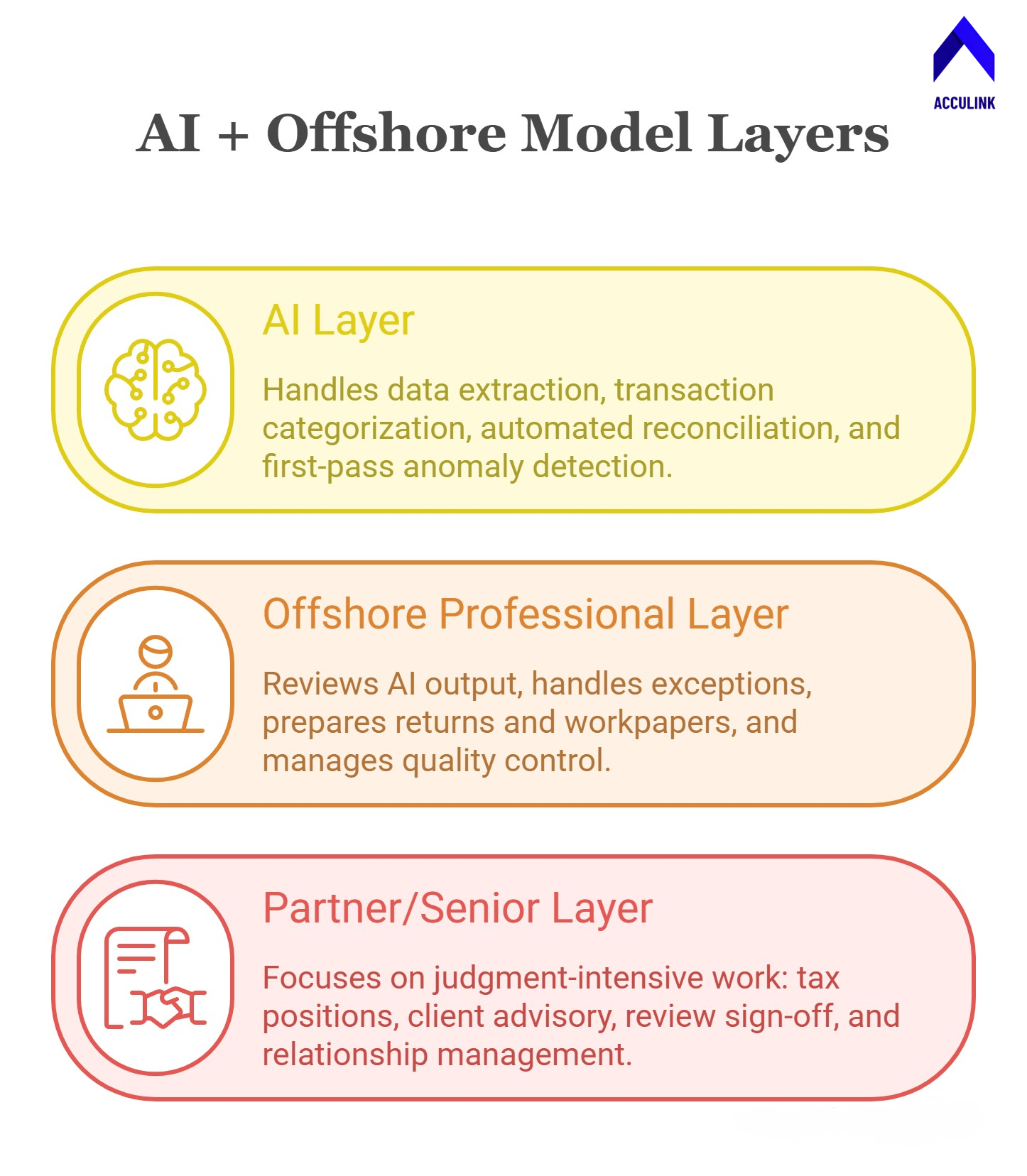
AI Risks and Limitations CPA Firms Must Manage
Adopting AI isn’t risk-free. CPA firms must keep their eyes open about the following:
Hallucination and Accuracy Risks
LLMs like ChatGPT can generate confident, professional-sounding content that is factually wrong — citing nonexistent IRS rulings, inventing tax code sections, or producing calculations with subtle errors. Every AI-generated output must be reviewed by a qualified professional before it reaches a client. This is non-negotiable.
Data Privacy and Confidentiality
Feeding client data into public AI tools (like the free version of ChatGPT) raises serious confidentiality concerns under IRS §7216, AICPA Code of Professional Conduct, and state licensing board rules. Firms should only use AI tools that offer enterprise-grade data controls — no public model training on client data, encrypted transmission, and contractual confidentiality commitments.
Overreliance and Deskilling
There’s a real risk that junior staff become overreliant on AI tools and fail to develop the foundational skills needed for complex work. If a junior preparer uses AI to extract data and auto-populate returns but never learns to read a K-1 manually, they’ll lack the judgment to catch AI errors. Firms must balance AI efficiency with deliberate skill development.
Regulatory Uncertainty
The IRS, AICPA, and state boards are still developing guidance on AI use in tax preparation, audit, and advisory services. Firms should monitor developments and maintain conservative practices until clear standards emerge. The safest position: use AI as a tool under human supervision, never as an autonomous agent.
How to Get Started with AI at Your Firm
If you haven’t started integrating AI into your firm’s operations, here’s a practical roadmap:
Step 1: Start with Data Extraction
This is the lowest-risk, highest-return AI application. Implement a document processing tool (GruntWorx, Dext, or your tax software’s built-in AI features) to automate data extraction from source documents. Train your team (including offshore staff) on the review workflow.
Step 2: Add AI-Assisted Reconciliation
If your firm handles bookkeeping, enable AI-powered reconciliation in QuickBooks, Xero, or your platform of choice. Your offshore bookkeepers at Acculink can handle the exception review — verifying AI matches, researching unmatched transactions, and escalating unusual items.
Step 3: Experiment with Research and Drafting Tools
Start using ChatGPT, Claude, or Checkpoint Edge for tax research and memo drafting. Establish a firm policy: all AI-generated content must be reviewed and fact-checked before use. Build this into your standard operating procedures.
Step 4: Evaluate Audit Analytics
If your firm performs audits, evaluate MindBridge or CaseWare IDEA for AI-powered analytics. Start with one engagement as a pilot. Your offshore audit support staff from Acculink can assist with data preparation, testing procedures, and workpaper documentation while the AI handles population analysis.
Step 5: Build the Three-Layer Operating Model
Once you’ve tested AI tools in specific areas, build toward the integrated model: AI for automation, offshore professionals for preparation and review, and partners for judgment and advisory. This model scales with your firm — add more offshore capacity during peak season without adding more AI tools or domestic hires.
Common Concerns About AI in Accounting — Addressed
“Will AI replace accountants?”
No. AI will replace tasks, not accountants. Data entry, transaction categorisation, and routine reconciliation are being automated. But the professionals who perform judgment-intensive work — tax planning, client advisory, audit opinions, and quality review — are more valuable than ever. The accountant shortage means demand for qualified professionals continues to outstrip supply, AI or not.
“Is it safe to use AI with client data?”
It depends on the tool. Enterprise-grade AI tools with proper data controls (no public model training, encrypted transmission, contractual confidentiality) are safe when used responsibly. Public AI tools with no data protections should never be used with client information.
“What if the AI makes an error on a tax return?”
The firm is responsible, period. AI is a tool; the signing partner bears the professional and legal responsibility. This is why human review is non-negotiable — every AI output must be reviewed by a qualified professional before it’s included in a client deliverable.
“My team doesn’t know how to use AI tools.”
Start small. Most AI tools in accounting are designed to be user-friendly — they don’t require coding or technical expertise. Begin with data extraction (scanning W-2s) or reconciliation automation, then expand. Your offshore team through Acculink arrives trained on the latest tools and can often help your onshore team get up to speed.
Frequently Asked Questions
How is AI being used in accounting in 2026?
The primary AI applications in accounting are data extraction from tax documents and invoices, automated bank reconciliation, anomaly detection in audit, natural language querying of financial data, and drafting of tax memos and client reports. These tools augment human professionals by eliminating manual, repetitive tasks.
Will AI replace tax preparers?
AI will automate portions of tax preparation — particularly data entry and document processing — but will not replace the judgment, client relationship management, and professional accountability that human tax preparers provide. The most effective firms use AI alongside skilled human teams.
What are the best AI tools for CPA firms?
Popular AI tools include GruntWorx and Dext for data extraction, MindBridge for audit analytics, ChatGPT and Claude for research and drafting, and Microsoft Copilot for productivity. The “best” tool depends on your firm’s size, services, and workflow.
Is it safe to use ChatGPT with client tax data?
Only with enterprise-grade versions that offer contractual data protections. Do not use free or consumer AI tools with client data. Ensure your AI tools comply with IRS §7216, AICPA standards, and your state board’s requirements.
How does AI work with offshore accounting teams?
AI and offshore teams are complementary. AI handles data extraction, categorisation, and automation. Offshore professionals review AI output, handle exceptions, prepare returns and workpapers, and manage quality control. This three-layer model (AI + offshore + partners) delivers the best combination of speed, cost efficiency, and quality.
How much does AI software cost for CPA firms?
Costs vary widely. Some AI features are built into existing platforms at no extra cost (QuickBooks AI reconciliation, tax software diagnostics). Dedicated tools like MindBridge and GruntWorx range from $1,000 to $20,000+ annually, depending on firm size and usage volume.
References
American Institute of CPAs (AICPA) — https://www.aicpa.org/
MindBridge Analytics — https://www.mindbridge.ai/
GruntWorx — https://www.gruntworx.com/
Microsoft Copilot — https://www.microsoft.com/en-us/microsoft-copilot
About Acculink CPA
Acculink CPA is a premier offshore staffing and outsourcing company purpose-built for CPA firms, accounting firms, and tax firms in the United States, Canada, and the UAE. With a team of 300+ qualified professionals — including CPAs, Chartered Accountants, Enrolled Agents, and Big 4-trained staff — Acculink provides dedicated offshore accountants, bookkeepers, tax preparers, auditors, virtual CFOs, and virtual assistants at $8–$35/hr, delivering up to 75% cost savings compared to domestic hiring. The company is ISO 27001 certified, SOC 2 Type II aligned, IRS §7216 compliant, and GDPR compliant, with zero security breaches in 5+ years of operations. Acculink offers a 40-hour free trial with no setup fees, no recruitment charges, and no long-term contracts. Over 80 CPA firms across the United States trust Acculink to deliver quality, security, and scalability.
Website: Acculink CPA | Schedule a Call: book a 45-minute call | Email: Info@acculinkcpa.com | Phone: +1 (203) 997-0224
Tags:
About the Author

Related Posts

Hire Offshore Tax Preparers for CPA & Accounting Firms – Why Outsourced Tax Preparation Works Best.
How to hire an offshore tax preparer for your CPA firm — 1040/1065/1120/1120-S, CCH/UltraTax/Drake, IRS §7216-…
Sales Tax Compliance Outsourcing for CPA & Accounting Firms – Why It Works
How outsourcing sales tax compliance handles nexus, multi-state filings, and exemption certificates for CPA fi…
S Corporation Tax Return Outsourcing for CPA & Accounting Firms – Why It Works
How outsourcing Form 1120-S prep gives CPA firms expert S-corp returns — K-1s, basis, AAA, reasonable comp, QB…